INVITE-ONLY SCRIPT
更新済 Risk Parity Calculator | QuantumResearch
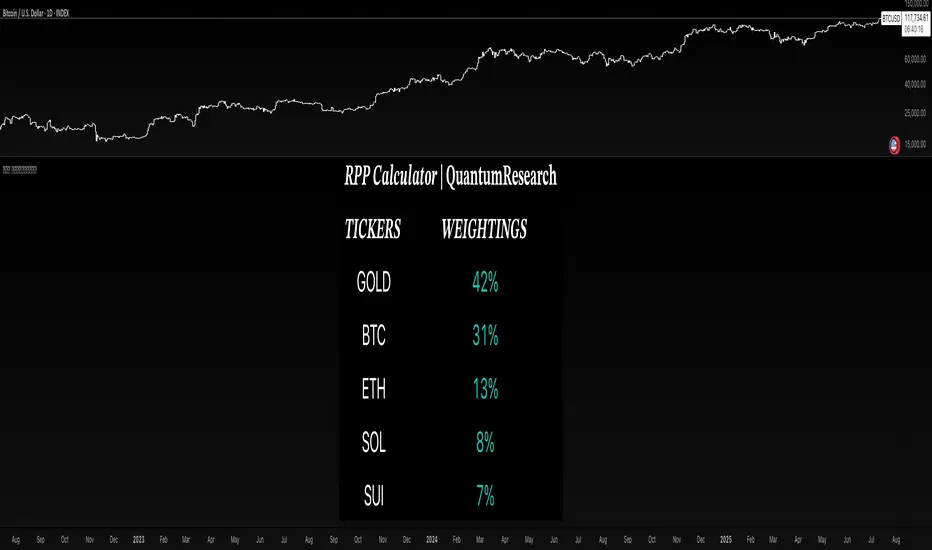
📊 Risk Parity Calculator | QuantumResearch
The Risk Parity Calculator by QuantumResearch is a dynamic asset allocation tool designed to help traders and portfolio managers distribute risk equally across multiple assets based on their relative volatility.
This script implements a simplified risk parity methodology, where allocation weights are inversely proportional to the recent volatility of each asset. The goal is to construct a portfolio in which each asset contributes equally to overall risk, rather than allocating by notional value or market cap.
🧠 How It Works
The indicator allows you to select up to 5 different assets (crypto, forex, indices, or commodities) and computes the following:
Logarithmic Return Volatility:
Uses log returns to calculate historical standard deviation over a custom period (default 14 bars).
Inverse Volatility Weighting:
Each asset’s weight is determined by 1 / volatility. Lower volatility assets receive higher weights.
Normalization:
All inverse volatility values are summed, and each is divided by that sum to generate the final weight (∑weights = 1).
Visual Output:
The results are shown in a custom table displaying:
Asset Tickers
Their respective portfolio weightings
Color-coded visuals to quickly assess risk-balanced contributions
This method favors diversification and seeks to reduce concentration risk by avoiding overexposure to more volatile assets like BTC or SOL, unless their volatility drops.
⚙️ Key Features
🔢 Supports 5 Custom Assets
Easily choose any combination of assets to construct your portfolio.
⚖️ Equalized Risk Contribution
Allocations scale automatically to reduce overexposure to high-volatility instruments.
🎨 Color-Coded Table
Visualizes relative weights, with color cues based on magnitude.
🔧 Adjustable Lookback
Modify the length used to compute volatility, giving you control over sensitivity.
🖥️ Flexible Table Position & Font Size
Fully customizable to match your layout preferences.
💡 How to Use It
Select your 5 assets using the input panel.
Set the length to control the volatility calculation window.
Observe the table output showing current risk-parity weights.
Use this to rebalance your portfolio, or validate your current exposure.
This is especially useful for portfolio reallocation, ETF modeling, or any strategy seeking risk-balanced diversification.
🛑 Disclaimer
This tool provides a simplified view of risk parity allocation and does not include cross-asset correlations or covariance matrix modeling. It is not a financial recommendation. Past performance and calculated weights do not guarantee future outcomes. Always apply proper risk management and conduct your own analysis.
The Risk Parity Calculator by QuantumResearch is a dynamic asset allocation tool designed to help traders and portfolio managers distribute risk equally across multiple assets based on their relative volatility.
This script implements a simplified risk parity methodology, where allocation weights are inversely proportional to the recent volatility of each asset. The goal is to construct a portfolio in which each asset contributes equally to overall risk, rather than allocating by notional value or market cap.
🧠 How It Works
The indicator allows you to select up to 5 different assets (crypto, forex, indices, or commodities) and computes the following:
Logarithmic Return Volatility:
Uses log returns to calculate historical standard deviation over a custom period (default 14 bars).
Inverse Volatility Weighting:
Each asset’s weight is determined by 1 / volatility. Lower volatility assets receive higher weights.
Normalization:
All inverse volatility values are summed, and each is divided by that sum to generate the final weight (∑weights = 1).
Visual Output:
The results are shown in a custom table displaying:
Asset Tickers
Their respective portfolio weightings
Color-coded visuals to quickly assess risk-balanced contributions
This method favors diversification and seeks to reduce concentration risk by avoiding overexposure to more volatile assets like BTC or SOL, unless their volatility drops.
⚙️ Key Features
🔢 Supports 5 Custom Assets
Easily choose any combination of assets to construct your portfolio.
⚖️ Equalized Risk Contribution
Allocations scale automatically to reduce overexposure to high-volatility instruments.
🎨 Color-Coded Table
Visualizes relative weights, with color cues based on magnitude.
🔧 Adjustable Lookback
Modify the length used to compute volatility, giving you control over sensitivity.
🖥️ Flexible Table Position & Font Size
Fully customizable to match your layout preferences.
💡 How to Use It
Select your 5 assets using the input panel.
Set the length to control the volatility calculation window.
Observe the table output showing current risk-parity weights.
Use this to rebalance your portfolio, or validate your current exposure.
This is especially useful for portfolio reallocation, ETF modeling, or any strategy seeking risk-balanced diversification.
🛑 Disclaimer
This tool provides a simplified view of risk parity allocation and does not include cross-asset correlations or covariance matrix modeling. It is not a financial recommendation. Past performance and calculated weights do not guarantee future outcomes. Always apply proper risk management and conduct your own analysis.
リリースノート
Ability now to able/enable the number of tickers.招待専用スクリプト
このスクリプトは作者が承認したユーザーのみアクセス可能です。使用するにはアクセス申請をして許可を得る必要があります。通常は支払い後に承認されます。詳細は下記の作者の指示に従うか、QuantumResearchに直接お問い合わせください。
TradingViewは、作者を完全に信頼し、スクリプトの動作を理解していない限り、有料スクリプトの購入・使用を推奨しません。コミュニティスクリプトには無料のオープンソースの代替が多数あります。
作者の指示
Get access to this script here: https://whop.com/quantumresearch-tradingsuite

🌐 Gain access to our cutting-edge tools:
whop.com/quantum-whop/
⚒️ Get access to our toolbox here for free:
quantumresearchportfolio.carrd.co
All tools and content provided are for informational and educational purposes only.
whop.com/quantum-whop/
⚒️ Get access to our toolbox here for free:
quantumresearchportfolio.carrd.co
All tools and content provided are for informational and educational purposes only.
免責事項
この情報および投稿は、TradingViewが提供または推奨する金融、投資、トレード、その他のアドバイスや推奨を意図するものではなく、それらを構成するものでもありません。詳細は利用規約をご覧ください。
招待専用スクリプト
このスクリプトは作者が承認したユーザーのみアクセス可能です。使用するにはアクセス申請をして許可を得る必要があります。通常は支払い後に承認されます。詳細は下記の作者の指示に従うか、QuantumResearchに直接お問い合わせください。
TradingViewは、作者を完全に信頼し、スクリプトの動作を理解していない限り、有料スクリプトの購入・使用を推奨しません。コミュニティスクリプトには無料のオープンソースの代替が多数あります。
作者の指示
Get access to this script here: https://whop.com/quantumresearch-tradingsuite
🌐 Gain access to our cutting-edge tools:
whop.com/quantum-whop/
⚒️ Get access to our toolbox here for free:
quantumresearchportfolio.carrd.co
All tools and content provided are for informational and educational purposes only.
whop.com/quantum-whop/
⚒️ Get access to our toolbox here for free:
quantumresearchportfolio.carrd.co
All tools and content provided are for informational and educational purposes only.
免責事項
この情報および投稿は、TradingViewが提供または推奨する金融、投資、トレード、その他のアドバイスや推奨を意図するものではなく、それらを構成するものでもありません。詳細は利用規約をご覧ください。