HIT Trend & CrossoverThis indicator displays the trend of a declining stock using two yellow trendlines, and when a trend reversal occurs, it marks the buy price with a green trendline and the stop-loss price with a red trendline.
Investors can use these four trendlines as a reference to generate their own profits.
バンドとチャネル

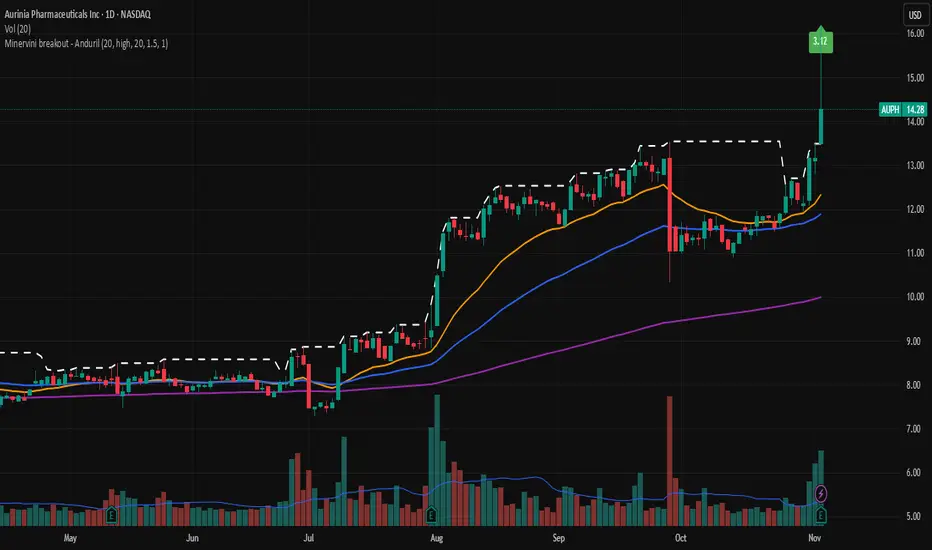
Minervini breakout - AndurilThis indicator checks the Mark Minerivini trend template as well checks consolidation areas and breakout.
Checks the highest closing price of last x days (default 20 days), exluding current day and draws a white dashed line, Calculates the relative volume of the current day. Calculates EMA 21, EMA50 and EMA200 and draws on the graph to define trend.
Gives a buy signal in green (writing relative strength of that day inside of green arrow) if:
1) Current price> breakout price* 0.98
2) Current price > EMA21 >EMA50>EMA200
3) Current price > 52 week high*0.75
4) Current price > 52 week low*1.3
5) EMA 200 of today > EMA 200 of 10 bar ago > EMA 200 of 20 bar ago
6) Relative volume of the day > 1.5
Structure Pro by MurshidfxInspired by the 'mentfx Structure' indicator created by Anton (mentfx) on TradingView,
## Overview
Structure Pro tracks market structure by maintaining an adaptive dealing range and its midpoint. Swing highs and lows become structural boundaries, and the script responds to confirmed breakouts by recalculating the active range. Labels highlight the latest trend flip so the chart stays readable while the range evolves.
## Core Logic
- Detects swing highs/lows using a configurable pivot strength and promotes confirmed pivots to structural levels.
- Applies a percentage buffer to decide when price truly breaks structure; once triggered, the opposite boundary is recalculated with an anchor search that looks back through historical bars.
- Computes equilibrium as the midpoint between the current structural high and low so you can gauge premium versus discount zones.
- Emits a single BULL or BEAR label when the trend state changes, keeping only the most recent signal on the chart.
## How to Use
1. Open a clean chart and apply only this script.
2. Select a swing strength that matches the scale you want to monitor (lower values for responsive intraday swings, higher values for broader moves).
3. Tune the structure sensitivity percentage if you prefer tighter or looser confirmation before declaring a breakout.
4. Track DRH/DRL for the current dealing range, use the equilibrium line as a mean-reversion guide, and look to the BULL/BEAR label for structure confirmation.
5. Combine the levels with your own execution, risk, and position rules—this script does not manage orders.
## Inputs
- Swing Point Strength: bars required on both sides to confirm a pivot.
- Structure Break Sensitivity: percentage buffer applied to the range before calling a breakout.
- Dealing Range display: toggles for visibility, line width/color, label text, and label size.
- Equilibrium display: line style, width, and color controls.
- Trend Signals: enable/disable labels, adjust text size, and pick label colors.
## Notes
- Designed for live structure tracking; the script relies on confirmed pivots and does not peek into future data.
- Built to be chart-agnostic for standard candles; non-standard chart types can distort the measurements.
- Published open-source so traders can review and verify the implementation details.

Breakout line - AndurilThis line shows the highest daily closing price of last 20 days default (can be adjusted from the settings). to help you to understand consolidation points and breakouts.

R Dominant Range [CRT] by Sergi SernaR Dominant Range identifies the most influential R range located to the left of the current price action. It highlights the dominant zone that still impacts market behavior, helping traders understand which range is controlling the current structure.

BB_4_in_1Bollinger Bands (4 in 1)
BB_4_in_1 is a multi-timeframe Bollinger Bands indicator that displays four different sets of Bollinger Bands on the price chart with customizable periods, line styles, and transparency levels. And just to simplify the process of applying indicators, + space saving.
Features:
- Four Bollinger Bands sets: bb_1 (20), bb_2 (80), bb_3 (160), bb_4 (320)
- Customizable period and multiplier for each set
- Unique line styles: standard, stepline, and stepline_diamond
- Adjustable line transparency for better visibility
- No fill between bands for cleaner chart layout
Ideal for multi-timeframe analysis, volatility assessment, and support/resistance level identification.

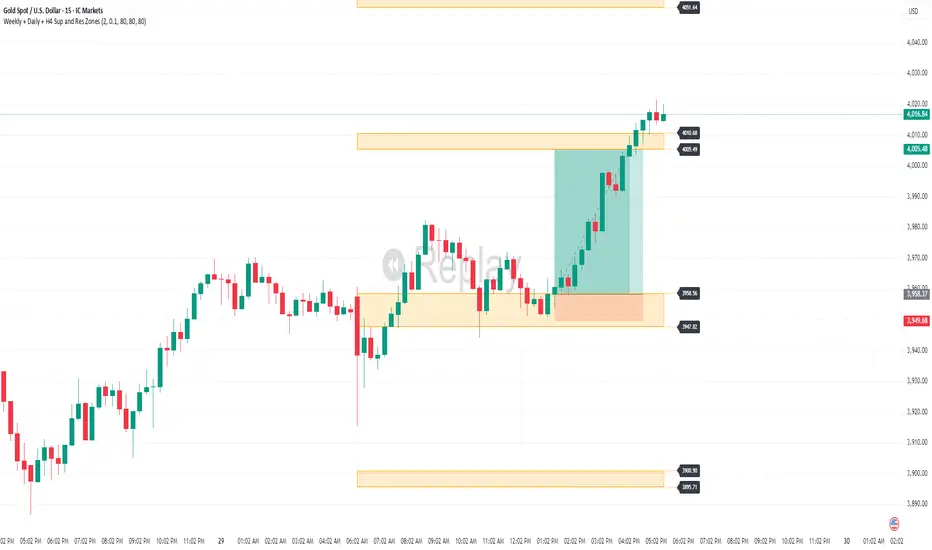
Weekly + Daily + H4 Sup and Res ZonesEveryday price move at a set range. Just wait at the zone for candle reversal/continuation pattern formation before entry. Always keep it simple. Patience is key. Just Pick your preferred tf zone. Daily zone highly recommended for less than 100 pips target. H4 for scalpers and Weekly for swingers.
Marshall Gold Spot SignalsPrediction of How It Will Behave (Live on Chart)
✅ Bullish Scenario (Uptrend Prediction)
If price:
Drops near or below the lower Bollinger Band
Then crosses above the SMA(20)
→ You’ll get a "BUY" label right below the candle.
🟢 What happens:
If trend continues up, SMA(20) moves above SMA(50)
Price trades between middle and upper BB
Potential continuation pattern
Confidence: High in sideways-to-uptrend markets
Target levels: Middle-to-upper BB
❌ Bearish Scenario (Downtrend Prediction)
If price:
Spikes near upper BB
Then crosses below the SMA(20)
→ You’ll get a "SELL" label above the candle.
🔻 What happens:
Price typically moves toward middle/lower BB
Possible SMA(20) < SMA(50) cross
Trendline drawn downward
Confidence: Strong in overbought markets
Target levels: BB Basis or BB Lower
🤔 Consolidation / Chop Zone
When:
Price stays between SMA(20) and SMA(50)
BB bands are tight
⚠️ You might get false signals back and forth (whipsaw)
Tip: Add RSI or trend filter to reduce noise
📊 Realistic Performance Expectations
Market Condition Signal Quality Best Use
Strong Trend ✅ High Trend-following entries
Ranging Market ⚠️ Medium to Low Better with filters (e.g. RSI)
Volatile Breaks ✅ Good with BB Volatility squeeze detection

KeyzoneKeyzone is a dynamic support and resistance framework that identifies price reaction zones using the highest and lowest values over specific lookback periods.
It consists of four pairs of upper and lower lines:
– Keyzone 3 (light green): short-term micro swing zones
– Keyzone 8 (dark green): short-term intraday zones
– Keyzone 21 (orange): medium-term structural zones
– Keyzone 89 (red): long-term major zones
Each Keyzone adapts automatically to price movement, helping traders see where market participants are likely to react. The shorter zones (3, 8) capture quick pullbacks, while the longer zones (21, 89) reveal deeper institutional levels. This makes Keyzone a clear, multi-layered visual map of market structure that adjusts with every new candle.

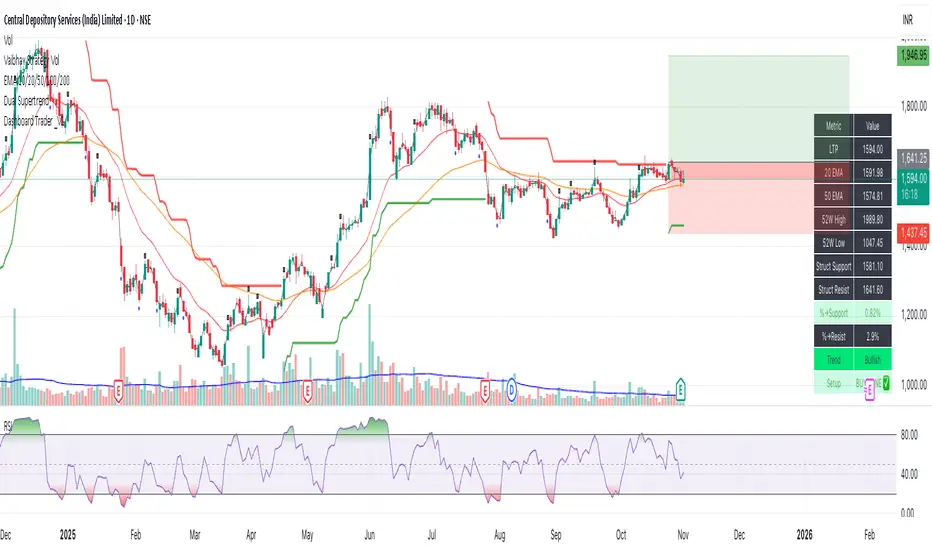
Dashboard Trader _V1
📊 Dashboard Trader – Adaptive Structure, Trend & Zones
Description:
NSE Dashboard V3 is a next-gen support–resistance and trend-mapping indicator designed for positional and swing traders. It combines price structure, moving averages, and adaptive pivot logic to highlight Buy Zones, Take-Profit Zones, and overall market direction — all inside a clean, compact dashboard.
⸻
🧩 What It Does
• Auto-detects structural support & resistance zones using adaptive pivot clustering logic.
• Tracks broken levels dynamically — old supports removed, new ones added.
• Identifies trend bias using dual EMAs (20-EMA & 50-EMA).
• Displays a live dashboard table showing:
• LTP (Last Traded Price)
• 20 EMA / 50 EMA
• 52-week High & Low (true daily data)
• Structural Support & Resistance
• % Distance to each zone
• Trend direction
• Trade Setup Zone → BUY ✅ / TAKE PROFIT ⚠ / NEUTRAL
⸻
🧠 How to Trade It
1. Check the trend:
• 20 EMA > 50 EMA → Bullish bias (look for long entries).
• 20 EMA < 50 EMA → Bearish bias (look for short or avoid longs).
2. Enter near support:
• When price is ≤ 2% above Struct Support and trend is bullish → BUY ZONE ✅
3. Exit or reduce near resistance:
• When price is ≤ 2% below Struct Resistance → TAKE PROFIT ⚠
4. If no valid resistance (at ATH):
• Trail stop below 20 EMA or last swing low.
⸻
⚙️ Key Features
• EMA-based trend detection
• Dynamic structural zone calculation (auto-updates)
• Daily timeframe 52-week High/Low
• Auto color-coded zones and table
• Works on all NSE stocks, futures, or indices
• Optional refresh every new bar
• Lightweight – optimized for live chart use
⸻
📈 Best Used For
• Swing trading / Positional setups (Daily or 4-hour charts)
• Intraday confirmation on lower timeframes (15-min+)
• Trend continuation entries and risk-defined reversals
⸻
⚠️ Disclaimer
This indicator is for educational purposes only.
It does not constitute financial advice or a buy/sell recommendation.
Always combine with your own price action, volume, and risk management.
⸻
💬 Author’s Note
Built for traders who think in zones, not signals.
Trade where risk is smallest and structure is strongest.
— Wealthcafe Investments
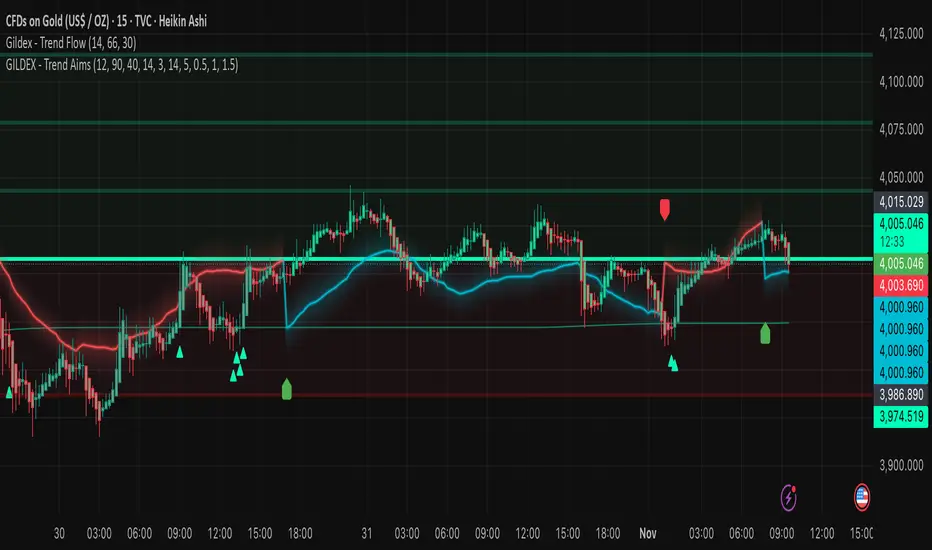
RAFEN-G - Kill Zones & Institutional Gaps🔍 What It Does
Kill Zones (KZ1, KZ2, KZ3)
Automatically highlights the main intraday liquidity windows such as the London open, NY AM, and NY PM sessions — customizable by time, color, and transparency.
Perfect for timing setups, identifying liquidity sweeps, or backtesting session behavior.
Institutional GAP Detection (NY 11:00 → 03:00)
Anchored on the New York H1 clock, the script automatically draws the “institutional gap” between the 11:00 close and the 03:00 open of the next trading day.
Each gap is drawn as a transparent box with a label showing its size in price units.
Dynamic Cleanup & Color Updates
Automatically removes old boxes beyond your chosen history limit and keeps all visuals perfectly synchronized in real-time.
⚙️ Key Features
3 fully independent and editable Kill Zones
Adjustable timezone (default: America/New_York)
Works on all intraday timeframes
Auto-management of historical data
Clean and lightweight visuals (up to 2000 boxes)
Real-time color and transparency updates
Alerts when each Kill Zone starts
🧠 Ideal For
Traders using ICT, SMC, or institutional frameworks who want clear visual separation of market sessions and automatic tracking of session-to-session gaps for confluence or imbalance analysis.
🕐 Recommended Use
Apply on 5 min / 15 min / 1 h charts, align timezone to NYC, and combine with liquidity or FVG tools for maximum insight.

Short-Timeframe Volume Spike DetectorShort-Timeframe Volume Spike Detector
Description:
The Short-Timeframe Volume Spike Detector is an advanced multi-timeframe (MTF) indicator that automatically detects sudden volume surges and price expansion events on a lower timeframe and displays them on a higher (base) timeframe chart — helping traders identify hidden intraday accumulation or breakout pressure within broader candles.
⚙️ How It Works
Select a Base Timeframe (e.g., Daily, 4H, 1H).
The script automatically fetches data from a Lower Timeframe (e.g., Daily → 1H, 1H → 15m).
Within each base bar, it scans all the lower timeframe candles to find:
Volume Spikes: Volume exceeds average × multiplier or a custom threshold.
Price Strength: Candle shows upward movement beyond a minimum % change.
When both conditions are met, a spike signal is plotted on the higher timeframe chart.
🔍 Features
✅ Automatic Lower Timeframe Mapping — Dynamically selects the most relevant lower timeframe.
✅ Two Detection Modes:
Multiplier Mode: Volume spikes defined as multiple of average lower timeframe volume.
Manual Mode: Custom absolute volume threshold.
✅ Trend Filter Option: Show only signals during uptrends (configurable).
✅ Visual Markers:
Purple “X” = Volume Spike Detected
Dotted red & green lines = Candle range extension
✅ Custom Label Placement: Above High / Below Low / At Spike Price
✅ Debug Mode: Displays full diagnostic info including detected volume, threshold, and % change.
📊 Use Cases
Detect early accumulation in daily candles using hourly or 15-min data.
Identify institutional buying interest before visible breakouts.
Confirm strong continuation patterns after price compression.
Spot hidden intraday activity on swing or positional charts.
🧩 Inputs Overview
Input Description
Base Timeframe Main chart timeframe for analysis
Lookback Bars Number of recent candles to scan
Volume Mode “Multiplier” or “Manual Benchmark”
Volume Multiplier Multiplier applied to average lower timeframe volume
Manual Volume Threshold Fixed volume benchmark
Min Price Change % Minimum lower timeframe candle % move to qualify
Use Trend Filter Only show in uptrend (close > close )
Extend Bars Number of bars to extend dotted lines
Label Position Choose Above High / Below Low / At Spike Price
Debug Mode Show live internal values for calibration
🧠 Tips
Ideal for swing traders and multi-timeframe analysts.
Works best when base = Daily and lower = Hourly or 15m.
Combine with Volume Profile, VWAP, or RRG-style analysis for stronger confluence.
Use Multiplier 1.5–2.5 to fine-tune for your asset’s volatility.
⚠️ Notes
Works only when applied to the base timeframe selected in inputs.
May not display signals on non-standard intraday timeframes (like 3H).
Labels limited to max_labels_count for performance stability.

My Smart Volume Profile – Fixed
Title: 🔹 My Smart Volume Profile – Fixed
Description:
Lightweight custom Volume Profile showing POC, VAH, and VAL levels from recent bars. Highlights the value area, marks price touches, and supports optional alerts.
Developer Note:
Created with precision and simplicity by Magnergy

Pi Toolkit – MAs & Volatility Bands (Label v6 Clean)learning how to code, trying to see if Pi will unlock the secrets of the market!
see if it works for anyone!
thanks again

MINE CBPR Lite ✦MINE CBPR ✦ Lite is the prototype foundation of the MINE CBPR ✦ Pro —
a streamlined, publicly available version built to introduce traders to the system’s advanced Channel Breakout and Pivot Reversal logic.
It retains the essential structural detection engine of the Pro version while simplifying its layers, allowing anyone to experience precise market reversals without complex filters or heavy computation.
Designed for clarity and accessibility, it provides actionable reversal insights across all markets — from crypto futures to indices and stocks.
As the official prototype, MINE CBPR ✦ Lite represents the first step toward the full CBPR ✦ Pro experience.
Test the Lite version, experience its structure, and take your trading further with the complete Pro edition.
When you upgrade to MINE CBPR ✦ Pro, you’ll unlock twice the number of signals, enhanced structural intelligence, and exclusive features of the full CBPR system — all with permanent lifetime access to the indicator.
Experience the complete power of CBPR ✦ Pro, built for precision, performance, and total market adaptability.

EMA Channel – Multi-Timeframe Adaptive Bands📘 Short Description (for TradingView listing)
A powerful, adaptive EMA channel indicator with independent timeframes for each band (Lower / Median / Upper), dynamic colors, and a smart configurable resistance line that can follow price, EMA, or ATR-based volatility.
Perfect for multi-timeframe confluence analysis, support/resistance mapping, and identifying early trend reversals.
🔹 Overview
The EMA Channel – Multi-Timeframe Adaptive Bands creates a dynamic price corridor that adapts to volatility and structure across multiple timeframes.
Each of the three bands (Lower, Median, and Upper) is independently configurable with its own:
Timeframe
EMA length
Source (close, hl2, ohlc4)
Line width, color logic, and visibility
The indicator also features automatic color shifts depending on price position, providing instant trend context.
🔹 Core Features
✅ Lower/Base EMA (Support)
Anchored EMA that defines the lower boundary of the trend channel.
Turns blue when price is above (bullish control) and red when price breaks below.
✅ Median Line (Neutral / Balance Zone)
Can either be its own EMA or automatically calculated as the midpoint between lower and upper bands.
Yellow below price, red above – clear mid-zone visualization.
✅ Upper Band (Dynamic Resistance)
Built above the selected anchor (Lower EMA, Median, Own EMA, or Price).
Configurable by ATR, Percentage offset, or ATR + Percentage combo.
Additional fine-tuning options:
Minimum gap (ATR or % based)
Absolute offset (price units)
EMA smoothing for a cleaner visual curve
Turns green when above price (active resistance) and red if price breaks through.
✅ Multi-Timeframe Engine
Each band is computed in its own timeframe (5D, 1D, 4H, etc.), making the tool highly adaptable for cross-TF confluence setups.
The "Hold HTF value between bars" option ensures smooth visualization when switching chart timeframes.
✅ Optional Channel Fill
Soft gray background fill between Lower and Upper bands for quick recognition of the dominant structure.
🔹 Typical Use Cases
Identify multi-timeframe trend channels and reversals.
Use the Upper band as adaptive resistance and the Lower EMA as dynamic support.
Combine with volume and RSI/MACD for confirmation of breakouts or retests.
Works for crypto, forex, indices, and stocks.
🔹 Technical Notes
Uses request.security() with barmerge.gaps_off and optional lookahead_on to preserve higher-timeframe integrity.
Compatible with all symbols and chart timeframes.
Designed for traders who rely on visual confluence and precision trend detection rather than single EMA signals.
🧠 Credits & Author Note
Developed by Bogdan TOMOIAGA – built for precision trend tracking, multi-timeframe analysis, and dynamic color feedback.
Inspired by institutional-grade volatility envelopes and enhanced with Pine v5 adaptive plotting.
⚠️ Disclaimer
This script is provided for informational and educational purposes only.
It does not constitute financial advice, trading advice, or investment guidance of any kind.
Past performance does not guarantee future results.
Trading involves risk — including the possible loss of capital.
Always do your own research and consult a licensed financial advisor before making any trading decisions.
The author and publisher of this script assume no responsibility or liability for any losses or damages resulting from its use.

My Smart Volume Profile – Fixed
Title: 🔹 My Smart Volume Profile – Fixed
Description:
Lightweight custom Volume Profile showing POC, VAH, and VAL levels from recent bars. Highlights the value area, marks price touches, and supports optional alerts.
Developer Note:
Created with precision and simplicity by Magnergy
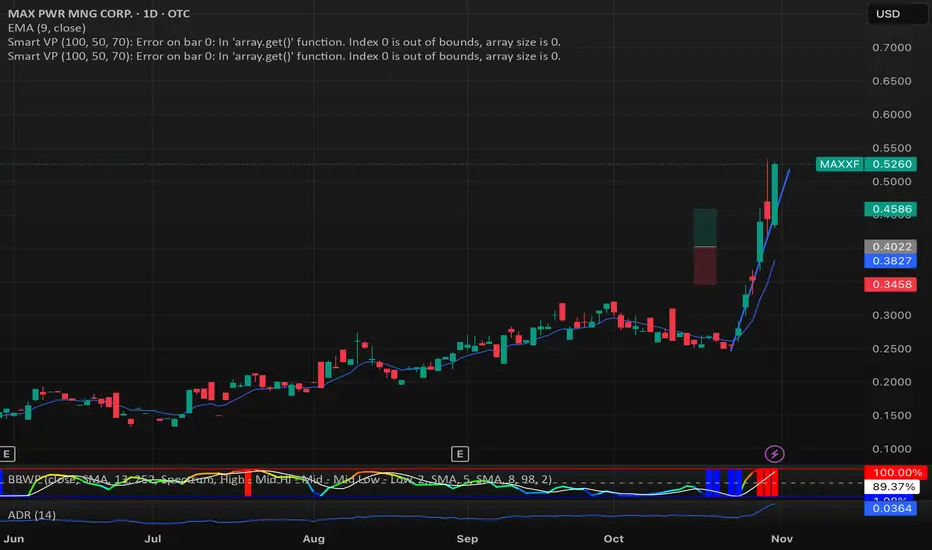
My Smart Volume Profile – Fixed
Title: 🔹 My Smart Volume Profile – Fixed
Description:
Lightweight custom Volume Profile showing POC, VAH, and VAL levels from recent bars. Highlights the value area, marks price touches, and supports optional alerts.
Developer Note:
Created with precision and simplicity by Magnergy


Margen de confianzaIt uses two moving averages (20 and 80). Based on their crossovers, you draw parallel bands.
The zone between these bands signals “confidence.” A downside break warns of risk; an upside break suggests price could push to new highs.
Son 2 medias moviles. Una de 20 y otra de 80. Utilizando los cruces se puede trazar lineas paralelas.
En las zonas que quedan entre estas lineas hay "confianza". Si el precio atraviesa para abajo hay peligro y si atraviesa para arriba puede ir a romper maximos

Power Law BTC IndicatorPOWER LAW BTC indicator:
A long-term price model that suggests Bitcoin's price follows a power law function over time. Unlike traditional stock market models that assume linear or exponential growth, the power law model suggests that Bitcoin's price scales in a predictable, non-random way over the long run

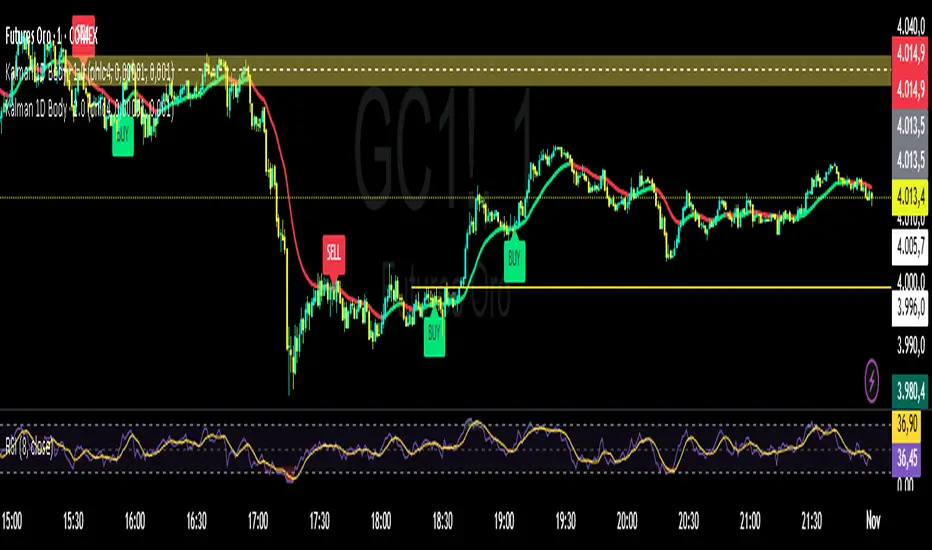
Kalman Filter by TwisterTrades(1D + Body Condition)
## 🧭 **Kalman Filter (1D + Body Condition)
This script implements a **true 1-dimensional Kalman Filter** applied to price data — not a simple moving average.
The Kalman Filter is a **Bayesian optimal estimation algorithm**, designed to separate **market noise** from the **true underlying trend** by dynamically adapting its sensitivity at every new bar.
Unlike **EMA**, **SMA**, or **VWAP**, which use fixed weighting formulas, the Kalman Filter **learns** how much to trust the current price based on how noisy and volatile the market is.
The result is a **smoother and smarter curve** that follows the real market direction while rejecting random fluctuations.
---
### ⚙️ **How It Works**
1. **Prediction:** The filter assumes the trend continues (predicts the next value).
2. **Update:** It compares the prediction with the actual price and updates its estimate based on:
* **Q (Process Noise):** how much the true trend can change.
* **R (Measurement Noise):** how noisy or unreliable the current price is.
3. The **Kalman Gain (K)** adjusts automatically — it becomes more responsive when volatility increases and more stable when the market is calm.
---
### 🎯 **Signals Logic**
The script generates **BUY** and **SELL** labels based on a combination of:
* **Trend direction:** whether the Kalman line is turning up or down.
* **Body confirmation:** the candle body closes entirely **above** or **below** the Kalman line.
**🟩 BUY signal:**
* Trend is turning bullish (line turning green).
* Candle body closes fully **above** the Kalman line.
**🟥 SELL signal:**
* Trend is turning bearish (line turning red).
* Candle body closes fully **below** the Kalman line.
You can enable alerts for both conditions:
```text
Kalman Filter: BUY signal detected (body above filter)
Kalman Filter: SELL signal detected (body below filter)
```
---
### 🔊 **Understanding Noise and Signals**
* **Noise** refers to short-term, random fluctuations in price (e.g. stop-hunts, low-volume spikes, or microstructure volatility).
* **Signal** refers to consistent, directional movement that carries information about the real trend.
The Kalman Filter works as a **signal extractor** — removing meaningless movements while keeping true directional momentum.
If the line is smooth and consistent, it means the market’s directional “signal” is clear.
If the line oscillates frequently, it means **noise dominates** — and trading signals should be taken with caution.
---
### ⏱️ **Recommended Timeframes and Parameters**
The strength of the filter depends on how noisy your timeframe is.
Here’s how to adjust it for different use cases:
| Purpose | Timeframe | Q (Process Noise) | R (Measurement Noise) | Description |
| ----------------------------- | --------- | ----------------- | --------------------- | --------------------------------------- |
| **Scalping / Microstructure** | 1m – 3m | 0.001 | 0.05 | Reacts faster, filters tick-level noise |
| **Intraday Bias / Trend** | 5m – 15m | 0.0001 | 0.01 | Balanced reactivity and smoothness |
| **Swing / Macro Bias** | 1H – 4H | 0.00001 | 0.001 | Very stable, great for clean trend bias |
💡 **Pro tip:**
* If the filter lags too much → increase **Q** slightly.
* If it reacts too much (too noisy) → increase **R** slightly.
* Always backtest adjustments visually for your market’s volatility (e.g. XAU/USD or NAS100).
---
### 📈 **Comparison with Other Indicators**
| Indicator | Adaptivity | Noise Filtering | Reactivity | Ideal Use |
| -------------------- | ---------------- | --------------- | ------------- | ---------------------------- |
| **SMA** | ❌ Fixed weights | ❌ Poor | ⚠️ Slow | Clean long trends |
| **EMA** | ⚠️ Semi-adaptive | ⚠️ Medium | ✅ Fast | Intraday direction |
| **VWAP** | ⚠️ Volume-based | ⚠️ Moderate | ✅ Good | Session-level bias |
| **Kalman Filter 1D** | ✅ Fully adaptive | ✅ Excellent | ✅ Intelligent | Any noisy or volatile market |
---
### 📊 **Usage Tips**
* Use the Kalman Filter as a **directional bias tool**, not a signal generator alone.
* Combine it with **price action**, **volume**, or **market structure** to confirm entries.
* Works exceptionally well on assets with **high noise and volatility** (e.g. XAU/USD, NASDAQ, BTCUSD).
* You can use the Kalman line instead of EMA50 or EMA100 — it provides a cleaner trend estimate without lagging as much in choppy conditions.
---
### ⚠️ **Disclaimer**
The Kalman Filter is not a predictive tool but a **state estimator** — it helps reveal the *true underlying direction* by filtering out noise.
It should be used together with sound risk management and a clear trading plan.