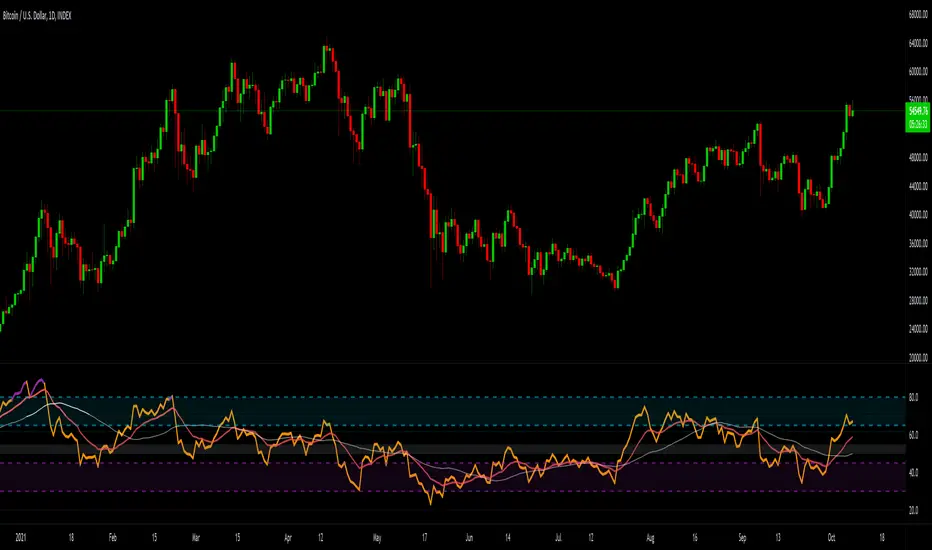
Universal Adaptive Tracking🙏🏻 Behold, this is UAT (Universal Adaptive Tracker) , with less words imma proceed how it compares with alternatives:
^^ comparison with non-adaptive quadratic regression (purple line), that has higher overshoots, less precision
^^ comparison with JMA and its adaptive gain. JMA’s gain is heavily limited, while UAT’s negative and positive gains are soft-saturated with p-order Möbius transform
This drop is inspired by, dedicated to, and made will all love towards Jurik Research , who retired in October 2k21. When some1 steps out, some1 has to step in, and that time it’s me (again xd). But there’s some history u gotta know:
Some history u gotta know:
In ~2008 dudes from forexfactory reverse engineered Jurik Moving Average
In late 1990s dudes from Jurik Research approximated the best possible adaptive tracking filter for evolution of prices via engineering miracles
Today in 2k26, me I'm gonna present to you the real mathematical objects/entities behind JMA top-edge engineered approximates. You will prolly be even more happy now then all the dem together back then.
Why all this?
When we talk about object tracking stuff, e.g. air defense, drones, missiles, projectiles, prices, etc, it all comes down to adaptive control and (Position & Velocity & Acceleration) aka PVA state space models (the real stuff many of you count as DSP ).
Why? Cuz while position (P) : (mean), or position & velocity (PV) : (linear regression) are stable enough in dem own ways, Position & Velocity & Acceleration (PVA) : (quadratic regression+) require adaptivity do be stable. And real world stuff needs PVA, due to non-linearity for starters.
So that’s why. If your goal is Really smoothing and no lag, u gotta go there. I see a lot of folks are crazy with it and want it, so here is it, for y’all. And good news, this is perfect for your favorite Moving Windows.
How to use it
The upper study:
The final filter (main state): just as you use other fast smoothers, MAs, etc, you know better than me here
You can also turn in volatility bands in script’s style settings, these do not require any adjustments
Finally, you can turn on, in the same place, separate trackers each based on negative and positive volatility exclusively. When both are almost equal, that indicates stability & persistence in markets. May sound like it’s nothing important, but I've never seen anything like it before. Also, if you'd allow your our inner mental gym hero gloriously arise, you can argue that these 2 separate trackers represent 2 fair prices (one for sellers, one for buyers). All better then 1 imaginary fair price for both (forget about it)
The lower study:
The lower study: you can analyze streams of upward of downward volatilities separately. This is incredibly powerful
You can also turn these off and turn on neg & pos intensities, and use them as trend detector, when each or both cross 1.5 (naturally neutral) threshold.
^^ Upper study with expected typical and maximum volatility bands turned On
...
The method explained
What you got in the end is non-linear, adaptive, lighting fast when needed and slow when required price tracking. All built upon real math entities/objects, not a brilliantly engineered approximation of them. No parameters to optimize, data tells it all.
... It all starts from a process model, in our cause this is...
MFPM (Mechanical Feedback Price Model)
Doesn’t make gaussian assumptions like most quant mainstream tech, accepts that innovations are Laplace “at best”, relies in L inf and L0 spaces.
I created this model neither trynna fit non-fitting ARMA / variants, nor trynna be silly assuming that price state evolution and markets are random.
Theory behind it: if no new volume comes, then price evolution would be simply guided by the feedback based on previous trading activity, pushing prices towards the midrange between 2 latest datapoints, being the main force behind so called “pullbacks” and reason why most pullbacks end just a bit past 50% of a move.
This is the Real mechanical feedback based mean reversion, that is always there in the markets no matter what, think of it as a background process that is always there, and fresh new volume deviates prices away from it. Btw, this can also be expressed as AR2 with both phis = 0.5 .
Then I separate positive and negative innovations from this model and process them separately, reflecting the asymmetry between buy and sell forces, smth that most forget. Both of these follow exponential distribution . Each stream has its own memory so here we use recursive operators . We track maximum innovations (differences between real and expected datapoints) with exponentially decaying damping factor, and keep tracking typical innovation, with the same factor.
Then we calculate what’s called in lovely audio engineering as “ crest factor ”, the difference is we don’t do RMS and stuff. But hey again we work with laplace innovations, so we keep things in L0 and L inf spirit. Then we go a couple of steps further, making this crest factor truly relative (resolution agnostic), and then, most importantly, we apply a natural saturation on it based on p-order Möbius transform, but not with arbitrary p and L, but guided by informational limits of the data. These final "intensity" parameters are what we need next to make our object tracking adaptive.
Extended Beta(2, 2) Window
This is imo the main part of this. Looking at tapering windows in DSP and how wavelets are made from derivatives of PDF functions of probability distributions, I figured that why use just one derivative? That made me come up with Universal Moving Average , that combines PDF and CDF of Beta(2, 2) distribution . And that is fine for P (position) tracking model.
Here we need PVA (position & velocity & acceleration). We can realize that everything starts from PDF, and by adding derivatives and anti-derivatives of it as factors of final window weights, we can create smth truly unique, a weightset that is non-arbitrary and naturally provides response alike quadratic regression does, But, naturally smoothed.
Why do I consider this a discovery, a primordial math object? Because x^2 itself and Beta(2, 2) based on it are the only primitives, esp out of all these dozens of DSP tapering windows, that provide you a finite amount of derivatives. You can keep differentiating Hann window until the kingdom f come, while Welch window aka Beta(2, 2) has a natural stopping point, because the 3rd derivative is 0, so we can’t use it. Symmetrically, we do 2 steps up from PDF, getting 1st and second anti-derivatives. What’s lovely, symmetrically, 3rd antiderivative even tho exist, it stops making any sense. 2nd one still makes sense, it’s smth like “potential” of probability distribution, not really discussed in mainstream open access sources.
Finally, the last part is to introduce adaptivity using these intensity exponents we’ve calculated with MFPM. We do 2 separate trackers, one using the negative intensity exponent, another one uses positive intensity exponent.
And at the end, even tho using both together is cool, the final state estimate is calculated simply as the state which intensity has higher.
^^ impulse response of our final kernel with fixed (non adaptive) intensity exponents: 1 (blue) and 2 (red). You see it's all about phase
…
And that’s all folks.
…
Actually no …
Last, not least, is the ability to add additional innovation weight to the kernel:
^^ Weighting by innovations “On”. Provides incredible tracking precision, paid with smoothness. I think this screenshot, showing what happened after the gap, and how the tracker managed to react, explains it all.
...
Live Long and Prosper, all good TradingView
∞
Control

Quality-Controlled Trend Strategy v2 (Expectancy Focused)This script focuses on quality control rather than curve-fitting.
No repainting, no intrabar tricks, no fake equity curves.
It uses confirmed-bar entries, ATR-based risk, and clean trend logic so backtests reflect what could actually be traded live.
If you publish scripts, this is the minimum structure worth sharing.
Why this script exists
TradingView’s public scripts are flooded with:
repainting indicators
no stop-loss logic
curve-fit entries that collapse live
strategies that look good only in hindsight
This script is intentionally boring but honest.
No repainting.
No intrabar tricks.
No fake equity curves
The goal is quality control, not hype.
What this strategy enforces
✔ Confirmed bars only
✔ Single source of truth for indicators
✔ Fixed risk structure
✔ No signal repainting
✔ Clean exits with unique IDs
✔ Works on any liquid market
Trading Logic (simple & auditable)
Trend filter
EMA 50 vs EMA 200
Entry
Pullback to EMA 50
RSI confirms momentum (not oversold/overbought)
Risk
ATR-based stop
Fixed R:R
One position at a time
This is the minimum bar for a strategy to be considered publish-worthy.
Why this helps TradingView quality
Most low-value scripts fail because they:
hide repainting logic
skip exits entirely
use inconsistent calculations
rely on hindsight candles
This strategy forces discipline:
every signal is confirmed
every trade has defined risk
behavior is repeatable across symbols & timeframes
If more scripts followed this baseline, TradingView’s public library would be far more usable.

Volume Profile Auto POC📌 Overview
Volume Profile Auto POC is a trend-following strategy that uses the automatically calculated Point of Control (POC) from the volume profile, combined with ATR zones, to capture reversals and breakouts.
By basing decisions on volume concentration, it dynamically visualizes the price levels most watched by market participants.
⚠️ This strategy is provided for educational and research purposes only.
Past performance does not guarantee future results.
🎯 Strategy Objectives
Automatically detect the volume concentration area (POC) to improve entry accuracy
Optimize risk management through ATR-based volatility adjustment
Provide early and consistent signals when trends emerge
✨ Key Features
Automatic POC Detection : Updates the volume profile over a defined lookback window in real time
ATR Zone Integration : Defines a POC ± 0.5 ATR zone to clarify potential reversals/breakouts
Visual Support : Plots the POC line and zones on the chart for intuitive decision-making
📊 Trading Rules
Long Entry:
Price breaks above the POC + 0.5 ATR zone
Volume is above average to support the breakout
Short Entry:
Price breaks below the POC - 0.5 ATR zone
Volume is above average to support the downside move
Exit (or Reverse Position):
Price returns to the POC area
Or touches the ATR band
⚙️ Trading Parameters & Considerations
Indicator Name: Volume Profile Auto POC
Parameters:
Lookback Bars: 50
Bins for Volume Profile: 24
ATR Length: 14
ATR Multiplier: 2.0
🖼 Visual Support
POC line plotted in red
POC ± 0.5 ATR zone displayed as a semi-transparent box
ATR bands plotted in blue for confirmation
🔧 Strategy Improvements & Uniqueness
This strategy is inspired by traditional Volume Profile + ATR analysis,
while adding the improvement of a sliding-window mechanism for automatic POC updates.
Compared with conventional trend-following approaches,
its strength lies in combining both price and volume perspectives for decision-making.
✅ Summary
Volume Profile Auto POC automatically extracts key market levels (POC) and combines them with ATR-based zones,
providing a responsive trend-following method.
It balances clarity with practicality, aiming for both usability and reproducibility.
⚠️ This strategy is based on historical data and does not guarantee future profits.
Always use proper risk management when applying it.

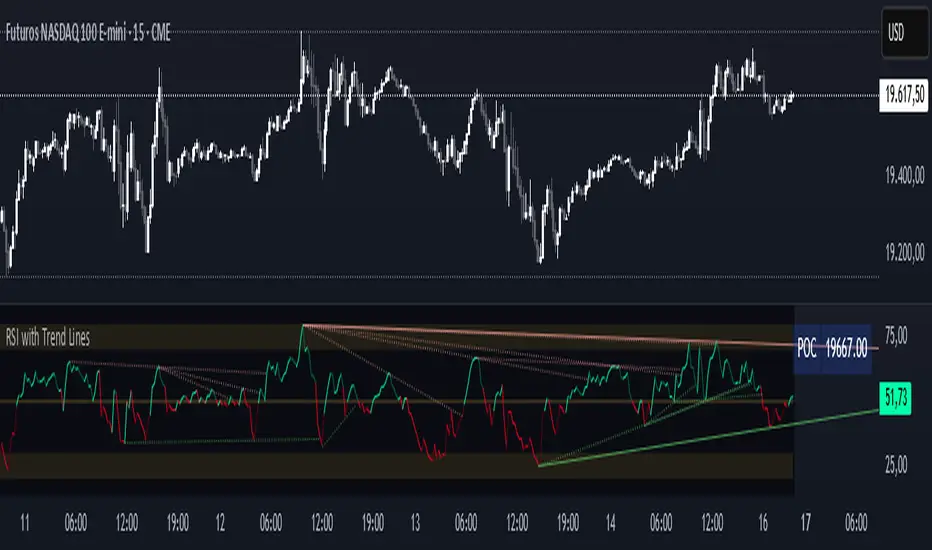
RSI with Trend LinesThe RSI with Trend Lines indicator is a tool designed to analyze the behavior of the Relative Strength Index (RSI) combined with dynamic trend lines. This indicator not only provides the standard RSI reading but also identifies pivot points on the RSI and draws bullish and bearish trend lines based on these points. It also includes customizable options for adjusting trend lines, displaying the RSI moving average, and highlighting key levels such as overbought, oversold, and the center line.
This indicator is ideal for finding and identifying clear trends in the RSI and taking advantage of market breakout or consolidation signals. It also includes a table with the POC value, which represents the price level at which the most trading activity has occurred, indicating the highest liquidity and highest trading volume.
Key Features:
1. Basic RSI:
• Calculates the RSI using a configurable period length (default 14).
• Colors the RSI based on its direction (green for rising, red for falling) and its position relative to the center line (50).
2. Key Levels:
• Displays overbought (70 and 80), oversold (20 and 30), and the center line (50) levels for easy visual interpretation.
3. RSI Moving Average:
• Enables and configures an RSI moving average (SMA, EMA, WMA, or ALMA) to smooth out fluctuations and detect clearer trends.
4. Dynamic Trend Lines:
• Identifies pivot points on the RSI and draws bullish and bearish trend lines.
• Trend lines can be extended into the future or limited to the visible range.
• Includes options to display broken lines (trends that are no longer valid) and customize the style (solid or dashed).
5. Pivot Points:
• Displays the high and low pivot points on the chart for a better understanding of trend changes.
6. Advanced Customization:
• Adjust the pivot point period.
• Control the number of pivot points to consider for trend lines.
• Customize the line thickness and style.
How to Use the Indicator:
1. RSI Interpretation:
• Overbought Zone (RSI > 70): Indicates that the asset may be overvalued and could correct downward.
• Oversold Zone (RSI < 30): Suggests that the asset may be undervalued and could rebound.
• Centerline Crossover (50): A cross above 50 indicates bullish strength, while a cross below suggests weakness.
2. Trend Lines:
• Bullish Lines: Drawn when the RSI forms ascending low pivot points. These lines represent dynamic support.
• Bearish Lines: These are drawn when the RSI forms descending high pivot points. These lines represent dynamic resistance.
• Broken Lines: When a trend line becomes invalid (the RSI breaks the line), they are displayed in a dotted style to highlight the breakout.
3. Possible Trading Signals:
• Buy: When the RSI breaks an upward downtrend line.
• Sell: When the RSI breaks a downward uptrend line.
• Trend Confirmation: When the RSI stays within a valid trend line, it suggests that the current trend is strong.
4. A chart with the POC value:
• The point of control is a price level at which the highest trading volume occurs in a given time period. It is a key component of the Volume Profile indicator, which displays volume by price.
• Use of the POC in trading:
• The POC is used to identify areas of high interest and liquidity for trading.
• The POC provides information about the equilibrium point where buyers and sellers are most evenly matched.
• Therefore, it can be considered a zone of interest, meaning it can act as support or resistance.