Google Trends: Dogecoin (Cryptollica) Google Trends: Dogecoin (Cryptollica) 2013-2026 Keyword: DogecoinPine Script® インジケーターCryptollicaの投稿2240
ALT Risk Metric StrategyHere's a professional write-up for your ALT Risk Strategy script: ALT/BTC Risk Strategy - Multi-Crypto DCA with Bitcoin Correlation Analysis Overview This strategy uses Bitcoin correlation as a risk indicator to time entries and exits for altcoins. By analyzing how your chosen altcoin performs relative to Bitcoin, the strategy identifies optimal accumulation periods (when alt/BTC is oversold) and profit-taking opportunities (when alt/BTC is overbought). Perfect for traders who want to outperform Bitcoin by strategically timing altcoin positions. Key Innovation: Why Alt/BTC Matters Most traders focus solely on USD price, but Alt/BTC ratios reveal true altcoin strength: When Alt/BTC is low → Altcoin is undervalued relative to Bitcoin (buy opportunity) When Alt/BTC is high → Altcoin has outperformed Bitcoin (take profits) This approach captures the rotation between BTC and alts that drives crypto cycles Key Features 📊 Advanced Technical Analysis RSI (60% weight): Primary momentum indicator on weekly timeframe Long-term MA Deviation (35% weight): Measures distance from 150-period baseline MACD (5% weight): Minor confirmation signal EMA Smoothing: Filters noise while maintaining responsiveness All calculations performed on Alt/BTC pairs for superior market timing 💰 3-Tier DCA System Level 1 (Risk ≤ 70): Conservative entry, base allocation Level 2 (Risk ≤ 50): Increased allocation, strong opportunity Level 3 (Risk ≤ 30): Maximum allocation, extreme undervaluation Continuous buying: Executes every bar while below threshold for true DCA behavior Cumulative sizing: L3 triggers = L1 + L2 + L3 amounts combined 📈 Smart Profit Management Sequential selling: Must complete L1 before L2, L2 before L3 Percentage-based exits: Sell portions of position, not fixed amounts Auto-reset on re-entry: New buy signals reset sell progression Prevents premature full exits during volatile conditions 🤖 3Commas Automation Pre-configured JSON webhooks for Custom Signal Bots Multi-exchange support: Binance, Coinbase, Kraken, Bitfinex, Bybit Flexible quote currency: USD, USDT, or BUSD Dynamic order sizing: Automatically adjusts to your tier thresholds Full webhook documentation compliance 🎨 Multi-Asset Support Pre-configured for popular altcoins: ETH (Ethereum) SOL (Solana) ADA (Cardano) LINK (Chainlink) UNI (Uniswap) XRP (Ripple) DOGE RENDER Custom option for any other crypto How It Works Risk Metric Calculation (0-100 scale): Fetches weekly Alt/BTC price data for stability Calculates RSI, MACD, and deviation from 150-period MA Normalizes MACD to 0-100 range using 500-bar lookback Combines weighted components: (MACD × 0.05) + (RSI × 0.60) + (Deviation × 0.35) Applies 5-period EMA smoothing for cleaner signals Color-Coded Risk Zones: Green (0-30): Extreme buying opportunity - Alt heavily oversold vs BTC Lime/Yellow (30-70): Accumulation range - favorable risk/reward Orange (70-85): Caution zone - consider taking initial profits Red/Maroon (85-100+): Euphoria zone - aggressive profit-taking Entry Logic: Buys execute every candle when risk is below threshold As risk decreases, position sizing automatically scales up Example: If risk drops from 60→25, you'll be buying at L1 rate until it hits 50, then L2 rate, then L3 rate Exit Logic: Sells only trigger when in profit AND risk exceeds thresholds Sequential execution ensures partial profit-taking If new buy signal occurs before all sells complete, sell levels reset to L1 Configuration Guide Choosing Your Altcoin: Select crypto from dropdown (or use CUSTOM for unlisted coins) Pick your exchange Choose quote currency (USD, USDT, BUSD) Risk Metric Tuning: Long Term MA (default 150): Higher = more extreme signals, Lower = more frequent RSI Length (default 10): Lower = more volatile, Higher = smoother Smoothing (default 5): Increase for less noise, decrease for faster reaction Buy Settings (Aggressive DCA Example): L1 Threshold: 70 | Amount: $5 L2 Threshold: 50 | Amount: $6 L3 Threshold: 30 | Amount: $7 Total L3 buy = $18 per candle when deeply oversold Sell Settings (Balanced Exit Example): L1: 70 threshold, 25% position L2: 85 threshold, 35% position L3: 100 threshold, 40% position (final exit) 3Commas Setup Bot Configuration: Create Custom Signal Bot in 3Commas Set trading pair to your altcoin/USD (e.g., ETH/USD, SOL/USDT) Order size: Select "Send in webhook, quote" to use strategy's dollar amounts Copy Bot UUID and Secret Token Script Configuration: Paste credentials into 3Commas section inputs Check "Enable 3Commas Alerts" Save and apply to chart TradingView Alert: Create Alert → Condition: "alert() function calls only" Webhook URL: api.3commas.io Enable "Webhook URL" checkbox Expiration: Open-ended Strategy Advantages ✅ Outperform Bitcoin: Designed specifically to beat BTC by timing alt rotations ✅ Capture Alt Seasons: Automatically accumulates when alts lag, sells when they pump ✅ Risk-Adjusted Sizing: Buys more when cheaper (better risk/reward) ✅ Emotional Discipline: Systematic approach removes fear and FOMO ✅ Multi-Asset: Run same strategy across multiple altcoins simultaneously ✅ Proven Indicators: Combines RSI, MACD, and MA deviation - battle-tested tools Backtesting Insights Optimal Timeframes: Daily chart: Best for backtesting and signal generation Weekly data is fetched internally regardless of display timeframe Historical Performance Characteristics: Accumulates heavily during bear markets and BTC dominance periods Captures explosive altcoin rallies when BTC stagnates Sequential selling preserves capital during extended downtrends Works best on established altcoins with multi-year history Risk Considerations: Requires capital reserves for extended accumulation periods Some altcoins may never recover if fundamentals deteriorate Past correlation patterns may not predict future performance Always size positions according to personal risk tolerance Visual Interface Indicator Panel Displays: Dynamic color line: Green→Lime→Yellow→Orange→Red as risk increases Horizontal threshold lines: Dashed lines mark your buy/sell levels Entry/Exit labels: Green labels for buys, Orange/Red/Maroon for sells Real-time risk value: Numerical display on price scale Customization: All threshold lines are adjustable via inputs Color scheme clearly differentiates buy zones (green spectrum) from sell zones (red spectrum) Line weights emphasize most extreme thresholds (L3 buy and L3 sell) Strategy Philosophy This strategy is built on the principle that altcoins move in cycles relative to Bitcoin. During Bitcoin rallies, alts often bleed against BTC (high sell, accumulate). When Bitcoin consolidates, alts pump (take profits). By measuring risk on the Alt/BTC chart instead of USD price, we time these rotations with precision. The 3-tier system ensures you're always averaging in at better prices and scaling out at better prices, maximizing your Bitcoin-denominated returns. Advanced Tips Multi-Bot Strategy: Run this on 5-10 different altcoins simultaneously to: Diversify correlation risk Capture whichever alt is pumping Smooth equity curve through rotation Pairing with BTC Strategy: Use alongside the BTC DCA Risk Strategy for complete portfolio coverage: BTC strategy for core holdings ALT strategies for alpha generation Rebalance between them based on BTC dominance Threshold Calibration: Check 2-3 years of historical data for your chosen alt Note where risk metric sat during major bottoms (set buy thresholds) Note where it peaked during euphoria (set sell thresholds) Adjust for your risk tolerance and holding period Credits Strategy Development & 3Commas Integration: Claude AI (Anthropic) Technical Analysis Framework: RSI, MACD, Moving Average theory Implementation: pommesUNDwurst Disclaimer This strategy is for educational purposes only. Cryptocurrency trading involves substantial risk of loss. Altcoins are especially volatile and many fail completely. The strategy assumes liquid markets and reliable Alt/BTC price data. Always do your own research, understand the fundamentals of any asset you trade, and never risk more than you can afford to lose. Past performance does not guarantee future results. The authors are not financial advisors and assume no liability for trading decisions. Additional Warning: Using leverage or trading illiquid altcoins amplifies risk significantly. This strategy is designed for spot trading of established cryptocurrencies with deep liquidity. Tags: Altcoin, Alt/BTC, DCA, Risk Metric, Dollar Cost Averaging, 3Commas, ETH, SOL, Crypto Rotation, Bitcoin Correlation, Automated Trading, Alt Season Feel free to modify any sections to better match your style or add specific backtesting results you've observed! 🚀Claude is AI and can make mistakes. Please double-check responses. Sonnet 4.5Pine Script® ストラテジーnakphananの投稿更新済 30
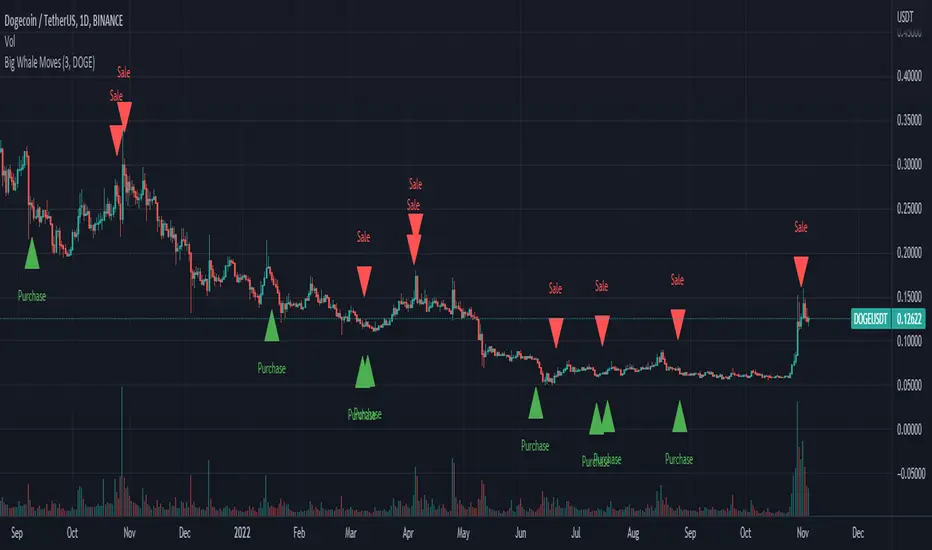
Big Whale Purchases and SalesBig Whale Purchases and Sales - plots big whale transactions on your chart! People that hold more than 1% of a crypto currencies circulating supply are considered whales and have a huge influence on price, not just because they can move the market with their huge transactions, but also because other traders often track their wallets and follow their example. Taking a look at whale holdings, one can see why whale worship is so common in crypto: While Bitcoin has a relatively low whale concentration, many of the Top 100 Cryptocurrencies have whales control 60% or more of their circulating supply. Integrating IntoTheBlock data, this script plots the transactions of these whales and, in strategy mode, copy trades them. Features: Strategy Mode: Switches the script between an indicator and a strategy. Standard Deviations: The number of Standard Deviations that a transaction needs to surpass to be considered worth plotting. Setting this to 0 will show all whale transactions, higher settings will only show the biggest transactions. Blockchain: The Chain on which Whale activity is tracked.Pine Script® ストラテジーPowerscooterの投稿更新済 66832
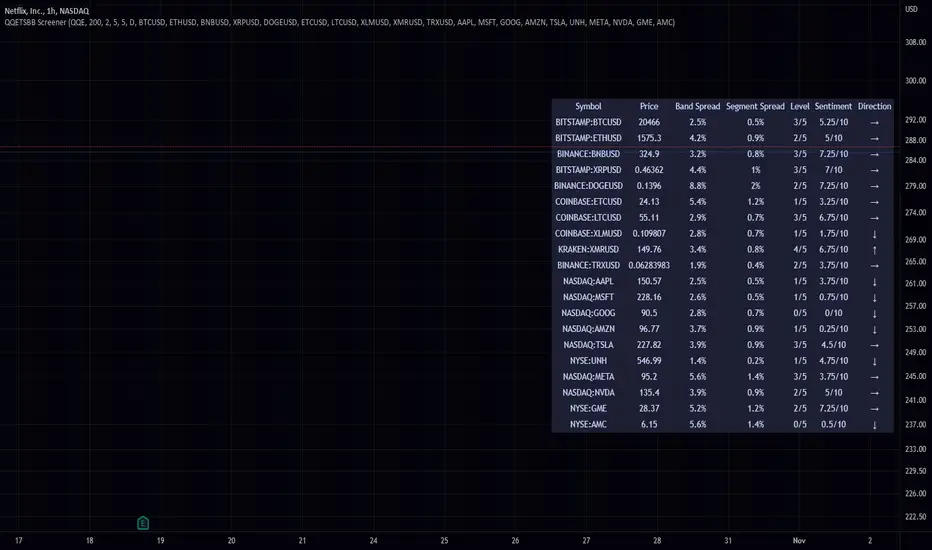
QQE Student's T-Distribution Bollinger Bands ScreenerThis script scans 20 custom symbols and displays the QQE Students T-Distribution Bollinger Bandwidth as a percentage, the quarter segment percentage, a score that tells you what segment of the band the price is in, and what direction the market is going in. This is useful because it can tell you how volatile a market is and how much reward is in the market. It also tells you what direction the market is going in so you can pick a symbol that has the best looking reward. I really hope that this script complements the group of indicators I have made so far. Here is a list of the other two indicators related to this script. Please enjoy!Pine Script® インジケーターThe_Peaceful_Lizardの投稿更新済 3376
PineGIF - Display Gifs & Images In Tradingview [LuxAlgo]Pinescript is not designed to create or display images, let alone gifs, but it's very fun to try, and that's what this script does. This script allows the user to display three different gifs. In this post, we explain how we managed to display images/gif's using pinescript tables. 1. Image Pre-Processing Due to pinescript limitations, we can't possibly display images with an excessively high resolution. As such we targeted pixel art as a primary image source. We used a pixel art gif of the magnificent Octocat (the mascot for the source-code hosting service GitHub) for our first try. We first extract each frame from the gif and resize them to a 50x50 resolution which returns frames made of 2500 pixels. This process was done using python. Getting Individual Pixels RGBA Values Python can easily return a matrix containing each pixel's rgba value. For convenience, we converted the rgba values to hex. We then create a simple code allowing us to return a pinescript array containing the 2500 pixel hex colors. We do this process for each frame. 2. Defining Table Cell Color In the code, each frame is its own array. We create a new table with dimensions equal to len(frame1)^2 (we assume height = width). The color of a cell is defined by the color of the image pixel at the same exact location. When a new bar is created, we do this exact process using a different frame which ultimately allows a new frame to be displayed. 3. Playing The GIFs By default, the script will play the gif of the Tradingview cloud logo raining. In order to play the gif, simply use the replay mode. The replay speed allows the user to determine the frame rate (0.1 for the raining cloud and Nyan cat works best, 0.5 for Octocat). We included the frames of the Octocat and Nyan cat gifs in the script. 4. Some Other Cool Images Displaying static images is possible and involves the same process described above. An original idea of the lizard, implemented by the wizard. Pine Script® インジケーターLuxAlgoの投稿77477