OPEN-SOURCE SCRIPT
MTF_Stochastic_Signal
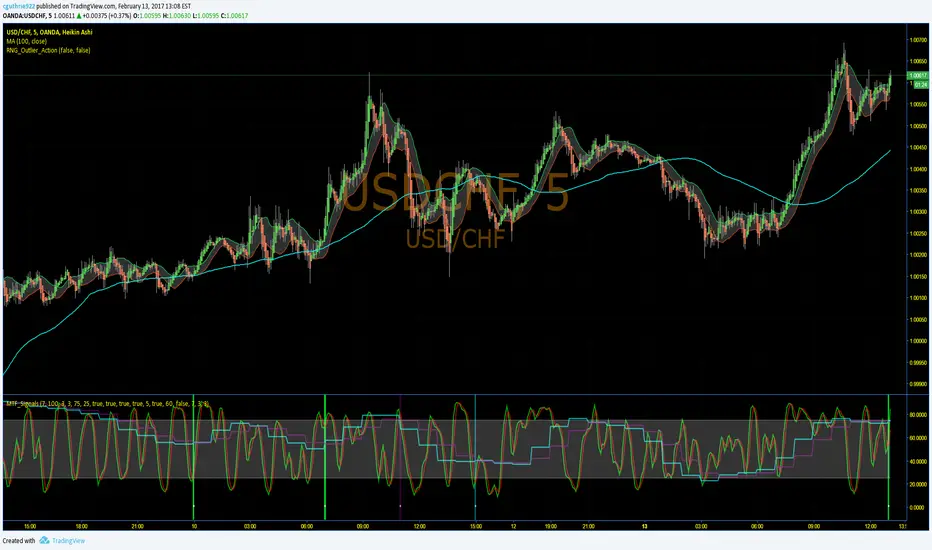
This script sets up signals based on Multi-timeframe (MTF) stochastics. Alerts can easily be created to inform users of aggressive and conservative potential BUY and SELL opportunities. Overbought and oversold levels do not matter when it comes to signalling, but each trader can set their own limits.
DEFAULT CRITERION
Conservative BUY criteria is when both stochastic timeframes cross upward at the same time the closing price is above the simple moving average.
Conservative SELL criteria is when both stochastic timeframes cross downward at the same time the closing price is below the simple moving average.
Aggressive BUY criteria is when both stochastic timeframes cross upward at the same time.
Aggressive SELL criteria is when both stochastic timeframes cross downward at the same time.
TO SET UP ALERTS
1. In the "Create Alert" menu, select the "MTF_Stochastic_Signal" as the Condition.
2. To the right of the condition select one of the options that has "greater than 1" at the end of it.
3. Instead of the word crossing in the dropdown below, select "Greater Than"
4. For the value, input 1. (My TRUE values are set to 50 in the event you want to turn the plot on, however, this is not neccessary as it is redundant)
5. Select the remaining options that suit your needs and click "Create". You have now set up alerts. I suggest setting all four options fo reach symbol you monitor.
Please feel free to ask questions and provide comments. I am always looking for ways to improve my scripts.
Enjoy!
DEFAULT CRITERION
Conservative BUY criteria is when both stochastic timeframes cross upward at the same time the closing price is above the simple moving average.
Conservative SELL criteria is when both stochastic timeframes cross downward at the same time the closing price is below the simple moving average.
Aggressive BUY criteria is when both stochastic timeframes cross upward at the same time.
Aggressive SELL criteria is when both stochastic timeframes cross downward at the same time.
TO SET UP ALERTS
1. In the "Create Alert" menu, select the "MTF_Stochastic_Signal" as the Condition.
2. To the right of the condition select one of the options that has "greater than 1" at the end of it.
3. Instead of the word crossing in the dropdown below, select "Greater Than"
4. For the value, input 1. (My TRUE values are set to 50 in the event you want to turn the plot on, however, this is not neccessary as it is redundant)
5. Select the remaining options that suit your needs and click "Create". You have now set up alerts. I suggest setting all four options fo reach symbol you monitor.
Please feel free to ask questions and provide comments. I am always looking for ways to improve my scripts.
Enjoy!
オープンソーススクリプト
TradingViewの精神に則り、このスクリプトの作者はコードをオープンソースとして公開してくれました。トレーダーが内容を確認・検証できるようにという配慮です。作者に拍手を送りましょう!無料で利用できますが、コードの再公開はハウスルールに従う必要があります。

All forecasts are based on analysis of past behavior. Prior movements are not always indicative of future movement. Develop the theory, test the theory. Do your own research. Nothing in this analysis constitutes advice. YouTube For More. Good luck!!
免責事項
この情報および投稿は、TradingViewが提供または推奨する金融、投資、トレード、その他のアドバイスや推奨を意図するものではなく、それらを構成するものでもありません。詳細は利用規約をご覧ください。
オープンソーススクリプト
TradingViewの精神に則り、このスクリプトの作者はコードをオープンソースとして公開してくれました。トレーダーが内容を確認・検証できるようにという配慮です。作者に拍手を送りましょう!無料で利用できますが、コードの再公開はハウスルールに従う必要があります。
All forecasts are based on analysis of past behavior. Prior movements are not always indicative of future movement. Develop the theory, test the theory. Do your own research. Nothing in this analysis constitutes advice. YouTube For More. Good luck!!
免責事項
この情報および投稿は、TradingViewが提供または推奨する金融、投資、トレード、その他のアドバイスや推奨を意図するものではなく、それらを構成するものでもありません。詳細は利用規約をご覧ください。