OPEN-SOURCE SCRIPT
更新済 XT Basic MA Crossover
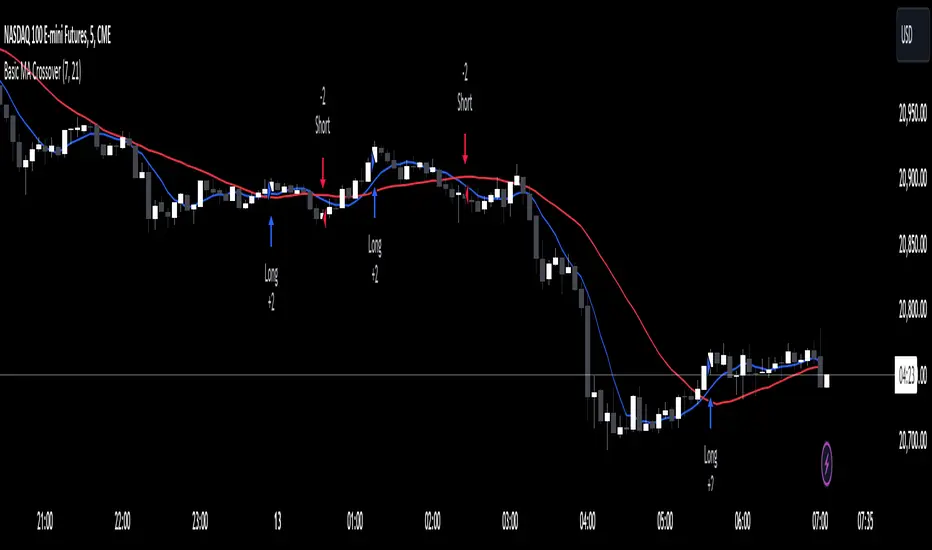
The XT Basic MA Crossover is designed to introduce the use of dynamic variables to your alert messages. Unlike the XT Up/Down Bar Indicator, which preloads the payload into the TradingView alert Message field, strategies do not support this functionality.
You will need to copy and paste into the message window for the alert to work using the strategy actions.
Example Alert Message:
```
key=Your CrossTrade Secret Key;
command=PLACE;
account=sim101;
instrument=ES 12-24;
action={{strategy.order.action}}
qty={{strategy.order.quantity}};
order_type=MARKET;
tif=DAY;
flatten_first=true;
```
You'll need to add your secret key to the message between = and ;
Correct: key=123456789123456789;
Incorrect: key=Your CrossTrade Secret Key123456789123456789;
You'll also need to add your webhook URL to the Notifications tab on the alert.
Visual Signals: The strategy is a simple moving average crossover using a 2 period MA to simulate a lot of frequent trades.
You can also add stops and targets to your strategy alerts by adding "take_profit" and "stop_loss" values to the message. This can be supplied as numerical values, percentages, or tick based values. Learn More.
If you need help: Here is a LINK to our TradingView alerts Help Doc.
Disclaimer: This indicator is designed and offered purely as an educational resource to showcase how to structure your alert messages. We do not suggest, advise, or recommend using this indicator in production with live capital.
You will need to copy and paste into the message window for the alert to work using the strategy actions.
Example Alert Message:
```
key=Your CrossTrade Secret Key;
command=PLACE;
account=sim101;
instrument=ES 12-24;
action={{strategy.order.action}}
qty={{strategy.order.quantity}};
order_type=MARKET;
tif=DAY;
flatten_first=true;
```
You'll need to add your secret key to the message between = and ;
Correct: key=123456789123456789;
Incorrect: key=Your CrossTrade Secret Key123456789123456789;
You'll also need to add your webhook URL to the Notifications tab on the alert.
Visual Signals: The strategy is a simple moving average crossover using a 2 period MA to simulate a lot of frequent trades.
You can also add stops and targets to your strategy alerts by adding "take_profit" and "stop_loss" values to the message. This can be supplied as numerical values, percentages, or tick based values. Learn More.
If you need help: Here is a LINK to our TradingView alerts Help Doc.
Disclaimer: This indicator is designed and offered purely as an educational resource to showcase how to structure your alert messages. We do not suggest, advise, or recommend using this indicator in production with live capital.
リリースノート
Removed the QTY input to simplify the scriptリリースノート
Updated to Pine Script V6リリースノート
Updated to provide inputs for the MA length and plotting on the chartリリースノート
Swapped the NT8 instrument format for the Pine Script {{ticker}} variable now that CrossTrade supports continuous contracts and will automatically convert the ticker into NT8s format.オープンソーススクリプト
TradingViewの精神に則り、このスクリプトの作者はコードをオープンソースとして公開してくれました。トレーダーが内容を確認・検証できるようにという配慮です。作者に拍手を送りましょう!無料で利用できますが、コードの再公開はハウスルールに従う必要があります。

免責事項
この情報および投稿は、TradingViewが提供または推奨する金融、投資、トレード、その他のアドバイスや推奨を意図するものではなく、それらを構成するものでもありません。詳細は利用規約をご覧ください。
オープンソーススクリプト
TradingViewの精神に則り、このスクリプトの作者はコードをオープンソースとして公開してくれました。トレーダーが内容を確認・検証できるようにという配慮です。作者に拍手を送りましょう!無料で利用できますが、コードの再公開はハウスルールに従う必要があります。
免責事項
この情報および投稿は、TradingViewが提供または推奨する金融、投資、トレード、その他のアドバイスや推奨を意図するものではなく、それらを構成するものでもありません。詳細は利用規約をご覧ください。