OPEN-SOURCE SCRIPT
更新済 Madrid MA Ribbon Bar
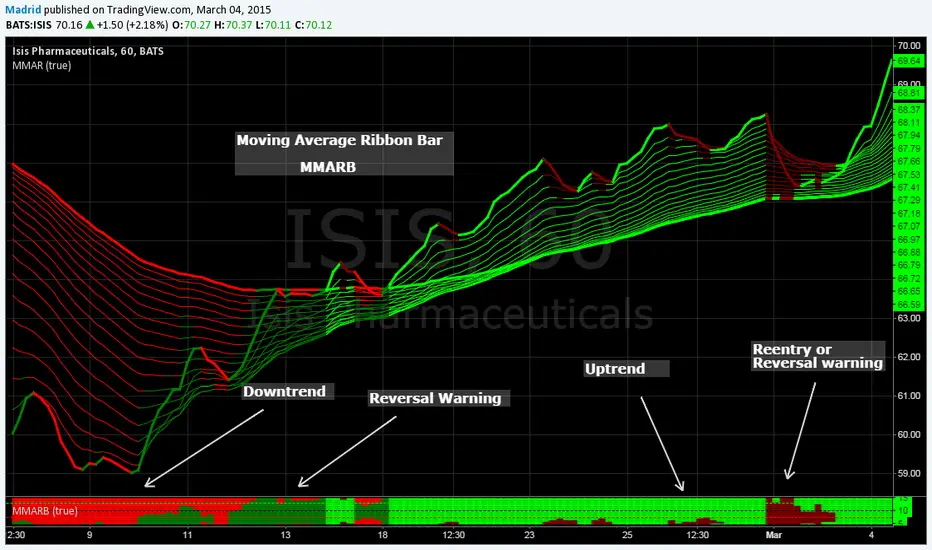
This is the MMAR companion study. This along with the MMAR study help visualize in a concise way the trend direction, patterns, trend strength, entry points and reversals.
Trading with MMAR: Look for the size of the bar, when it is partially filled with a color starting from bottom to top it means there is a reentry point, but if it fills 50% or more then there is a strong possibility that this will turn into a trend reversal. You may want to wait for confirmation. Normally after two or three solid bars you can have an idea of where the trend goes.
The standard colors are
1. Red : Downtrend
2. Maroon : Short reentry or uptrend warning
3. Lime : Uptrend
4. Green : Long reentry or downtrend warning
This indicator is based on the MMAR, so the only parameter it needs is the kind of MA you want to use, if you're using a regular standard moving average or an exponential moving average (this reduces lagging). Normally I use the exponential MA, which is the default value. It is simple, it only has four output values, it can be easily interpreted and practically no input parameters to tune. This doesn't require too much space on the screen
I suggest you to shrink the bar so it gives the visual effect of a solid bar and put it at the bottom of the screen.
Trading with MMAR: Look for the size of the bar, when it is partially filled with a color starting from bottom to top it means there is a reentry point, but if it fills 50% or more then there is a strong possibility that this will turn into a trend reversal. You may want to wait for confirmation. Normally after two or three solid bars you can have an idea of where the trend goes.
The standard colors are
1. Red : Downtrend
2. Maroon : Short reentry or uptrend warning
3. Lime : Uptrend
4. Green : Long reentry or downtrend warning
This indicator is based on the MMAR, so the only parameter it needs is the kind of MA you want to use, if you're using a regular standard moving average or an exponential moving average (this reduces lagging). Normally I use the exponential MA, which is the default value. It is simple, it only has four output values, it can be easily interpreted and practically no input parameters to tune. This doesn't require too much space on the screen
I suggest you to shrink the bar so it gives the visual effect of a solid bar and put it at the bottom of the screen.
リリースノート
Upgrade from PSv1 to PSv6オープンソーススクリプト
TradingViewの精神に則り、このスクリプトの作者はコードをオープンソースとして公開してくれました。トレーダーが内容を確認・検証できるようにという配慮です。作者に拍手を送りましょう!無料で利用できますが、コードの再公開はハウスルールに従う必要があります。

免責事項
この情報および投稿は、TradingViewが提供または推奨する金融、投資、トレード、その他のアドバイスや推奨を意図するものではなく、それらを構成するものでもありません。詳細は利用規約をご覧ください。
オープンソーススクリプト
TradingViewの精神に則り、このスクリプトの作者はコードをオープンソースとして公開してくれました。トレーダーが内容を確認・検証できるようにという配慮です。作者に拍手を送りましょう!無料で利用できますが、コードの再公開はハウスルールに従う必要があります。
免責事項
この情報および投稿は、TradingViewが提供または推奨する金融、投資、トレード、その他のアドバイスや推奨を意図するものではなく、それらを構成するものでもありません。詳細は利用規約をご覧ください。