• プロダクト
  • コミュニティ
  • マーケット
  • ブローカー
  • その他
始めましょう
  • インジケーターとストラテジー
  • /日

日

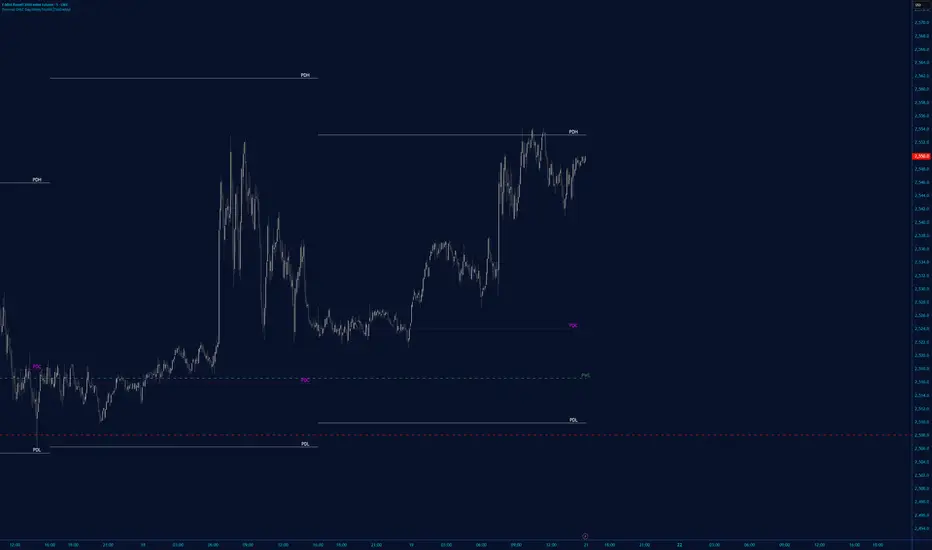
Multi-Day Liquidity Map (PDH/PDL History)This indicator implements a persistent multi-session liquidity level tracking framework for daily, weekly, and monthly ranges. Unlike traditional Previous Day High / Previous Day Low (PDH / PDL) indicators that only plot the latest session levels, this script stores and extends historical unmitigated highs and lows across multiple sessions. Levels remain active until price interacts with them, allowing traders to visualize untouched liquidity pools and structural reference levels. Core methodology: • Session-based high/low detection for daily, weekly, and monthly ranges • Persistent historical level tracking using dynamic arrays • Level lifecycle management (creation, extension, optional removal after mitigation) • Touch detection logic with real-time alerts on first interaction • User-configurable history depth and visualization parameters Key features: • Multi-day PDH/PDL history visualization • Previous Week High/Low (PWH/PWL) and Previous Month High/Low (PMH/PML) support • Optional level removal after mitigation • Custom colors, line styles, and labels • Alert system for first-touch liquidity events Use cases: • Liquidity mapping and market structure analysis • Identifying unmitigated institutional reference levels • Intraday trading and session-based confluence models This script is not a simple PDH/PDL plotter but a multi-session liquidity persistence framework designed for structural market analysis. Previously known as "Previous Day High & Low (PDH/PDL) with History".
Pine Script® インジケーター
Tantouiの投稿
Intraday Refuges/Shelters (RID)========================================== RID (INTRADAY SHELTERS/REFUGES) INDICATOR ========================================== *Fair warning: this may be more words than a humble, simple indicator truly needs… but Claude insisted. // ** INTRODUCTION ** // RID (Intraday Shelters/Refuges) is a lightweight, fast, and easy-to-implement indicator designed for monitoring price action on intraday timeframes — the same ones used by institutional operators to execute their trades within each market session. The indicator generates a framework of support and resistance levels automatically calculated from the asset's Daily Opening Price (D.O.P.). These levels are established using fixed percentages that have proven their effectiveness in institutional trading for decades, constituting "textbook" references widely adopted by market professionals. RID integrates as an optional module within our Weekly Shelters (RS) indicator, allowing the operator to simultaneously control their weekly positions and, when conditions warrant, move down to intraday operations without loading additional indicators or losing sight of the higher timeframe. // ** INDICATOR FUNDAMENTALS ** // The foundation of RID rests on a proven market principle: the daily opening price acts as a "psychological anchor" that influences participant behavior throughout the entire session. Why does this method work? • UNIVERSAL REFERENCE POINT: The daily opening price is objective data, visible to all market participants simultaneously. Institutions, algorithms, and retail traders use it as a common reference to calibrate their decisions. • STANDARD PERCENTAGE LEVELS: The percentages used (0.382%, 1.0%, 1.5%, 2.0%, 2.5% and extensions) are not arbitrary. They represent intraday volatility thresholds that have historically acted as inflection points across multiple asset classes. • SELF-FULFILLING PROPHECY EFFECT: When a critical mass of operators place orders at the same percentage levels —whether for profit-taking, protective stops, or entries— these levels become high-probability price reaction zones. • INSTITUTIONAL RISK MANAGEMENT: Institutional trading desks frequently define their daily loss limits and profit targets in percentage terms relative to the open. RID captures this logic and makes it visible for retail operators. The ±0.382% level deserves special mention: it's a derivation of the Fibonacci golden ratio (0.382) applied to the intraday context, representing the first significant movement threshold from the opening. // ** INDICATOR OBJECTIVES ** // 1) Facilitate manual intraday trade execution by providing a framework of target prices established under a scheme of mathematical certainty, eliminating subjectivity in defining entries, exits, and stops. 2) Serve as a lightweight and modular tool, easily integrable —either as an overlay or source code— with strategies and indicators specialized in intraday trade execution, both manual and automated. 3) Provide a visual reference framework that allows the operator to quickly assess the intraday market "temperature": Is price near a key support or resistance? Has it already reached the session's typical movement target? Is it time to seek entries or protect profits? // ** INDICATOR TECHNICAL FEATURES ** // • 21 CONFIGURABLE LEVELS: 11 main levels (±0.382%, ±1.0%, ±1.5%, ±2.0%, ±2.5% and D.O.P.) plus 10 extended levels (±3.0% to ±5.0%) for high volatility sessions. Each level can be individually enabled or disabled according to operator needs. • AUTOMATIC D.O.P. DETECTION: The indicator automatically identifies the start of each daily session and captures the opening price without user intervention. • CONFIGURABLE HISTORY LIMIT: Option to limit processing to the last N days (default: 3), optimizing performance on very low timeframes (1m, 5m) where excess historical data can slow down the chart. • PROFESSIONAL VISUALIZATION: Labels with formatted price (thousands separators) and percentage, placeable with configurable offset. The D.O.P. level (0%) is highlighted with differentiated width. • VERTICAL REFERENCE LINES: From D.O.P. to each level, facilitating visualization of the percentage distance traveled. • FULL CUSTOMIZATION: Colors, widths, line styles (solid, dashed, dotted), label opacity, and forward extension fully adjustable. • PRICE SCALE INTEGRATION: Levels can be displayed on the right margin of TradingView, controllable from the indicator's Style tab. • BAR REPLAY COMPATIBILITY: Works perfectly with Bar Replay for back-testing intraday strategies. • OPTIMIZED PERFORMANCE: Efficient architecture with persistent arrays and intelligent updating, suitable for timeframes down to 1 minute. // ** OPERATING INSTRUCTIONS ** // INITIAL SETUP: 1) Load the indicator on a chart with 4H or lower timeframe (1H, 30m, 15m, 5m, 1m). 2) Enable "Limit history by days" and adjust "Maximum days to display" according to your needs: • For scalping (1m-5m): 1-2 days • For day trading (15m-1H): 2-3 days • For intraday swing (4H): 3-5 days OPERATIONAL USE: 3) Identify the D.O.P. (0% line): This is your central reference point for the session. 4) Observe current price position relative to levels: • Price above D.O.P. → Session with bullish bias • Price below D.O.P. → Session with bearish bias 5) Use levels as: • ENTRIES: Look for reversal signals when price reaches S1-S5 (buys) or R1-R5 (sells) • TARGETS: Set take-profits at the next resistance level (longs) or support (shorts) • STOPS: Place protective stops beyond the immediate opposite level PRACTICAL RULES: 6) The ±1.0% and ±2.0% levels are historically most respected; prioritize them. 7) If price exceeds ±2.5% from open, it might be time to take profits and close your position or consider enabling extended levels (±3.0% to ±5.0%). 8) High volatility days (news, earnings): wait for price to respect at least one level before trading in its direction. 9) Combine RID with other indicators from our ecosystem (RS, RMP, RLP/RLPS) to confirm level confluence across multiple timeframes. VISUAL OPTIMIZATION: 10) For clean charts: keep enabled only main levels (±0.382% to ±2.5%). 11) For detailed volatile asset analysis: also enable extended levels. 12) Adjust "Label margin" to prevent overlap with current price. // ** INTEGRATION WITH OTHER SHELTER VALUE INDICATORS ** // RID is part of a complete shelter-based analysis ecosystem we have developed: • RLP (Long-Term Shelters): For automatic determination of the preponderant phase of a Zigzag, which institutional investors choose as the base of a Fibo whose levels calculate order placement projection over the following months and years. • RLPS (Simplified Long-Term Shelters): Simplified version of RLP where known coordinates of the preponderant phase are captured, obtained through own analysis or automatically with the RLP indicator. • RMP (Medium-Term Shelters): Provides psychological shelter and resistance levels that institutional investors establish at the beginning of each year. They constitute the main framework used by professionals to plan operations throughout the year. • RS (Weekly Shelters): For short-term tactical analysis (4H, 1H) based on selected phases of one or two Zigzags that define Fibo tracing, over recent major and minor degree pauses, whose levels take effect during the current and following weeks. • RID (Intraday Shelters): This indicator. For intraday operations based on levels calculated from daily opening price, designed for 4H or lower timeframes, including scalping strategies. By combining RID with RLP/RLPS, RMP and RS, a multilevel scaffolding is built that allows trading with clarity on any time horizon, from minute positions to operations projected over months and years. // ** NOTES ** // • All comments regarding detected errors and improvement suggestions are welcome and deeply appreciated. Your feedback helps us refine these tools. • To our Hispanic speaking friends, we sincerely regret to inform you that we have not included the Spanish translation in the published version, due to our latent concern regarding the ambiguous rules about prohibitions on publishing indicators documented or described in languages other than English. • Sharing is motivating because there’s no better way to receive genuine feedback of real acceptance. • RECOMMENDED VALIDATION METHOD: Use TradingView's Bar Replay to verify, session by session, how price of your favorite asset interacts with RID levels. This personal validation will give you statistical confidence before incorporating the indicator into your actual trading. Happy hunting in this magnificent jungle!
Pine Script® インジケーター
Masewal_aj_p_oolomの投稿
PowerDays - Day of the Week HUDDescription: Midnight HUD & Daily Session Dividers This indicator is designed to provide a clean, "Heads-Up Display" (HUD) for daily session tracking. It solves the common problem of cluttered charts by pinning the days of the week to the top of the chart window in a perfectly horizontal line, ensuring they remain visible and aligned regardless of price volatility or vertical scrolling. Key Features: Strict Midnight Dividers: Unlike standard "New Day" indicators that trigger at the exchange open (which can be 6:00 PM for some futures or forex pairs), this indicator plots a vertical dashed line at exactly 00:00 based on your chart's time zone. Centered HUD Labels: Days of the week (MONDAY, TUESDAY, etc.) are plotted in a level horizontal row at the top of the pane. Labels are mathematically centered between midnight dividers to provide a clear visual of the current trading day’s range. "Error-Proof" Architecture: Built using primitive plotting methods to avoid common Pine Script "Undeclared Identifier" errors, ensuring high compatibility across different TradingView versions and devices. Fully Customizable: Includes a built-in color picker to adjust the Royal Blue labels and session dividers to match your specific chart theme.
Pine Script® インジケーター
PowerEdgeTraderの投稿
更新済
ADR**Overview** This indicator displays the **Average Daily Range (ADR)** and **ADR Percentage** in a customizable table on your chart. While the standard ATR (Average True Range) is a popular metric for volatility, it accounts for price gaps (e.g., overnight moves). **ADR**, on the other hand, strictly measures the average distance between the **High** and **Low** of price bars, completely ignoring gaps. **Why use ADR instead of ATR?** * **Day Trading:** For intraday traders (Forex, Crypto, Futures), ADR is often preferred because it calculates the "tradable" range of the day. It answers the question: *"On average, how much does this asset move from High to Low?"* * **Target Setting:** ADR is excellent for projecting daily highs and lows. If price has already moved 100% of its ADR, the statistical probability of further extension decreases. * **Pure Volatility:** It filters out the noise of overnight gaps to show pure intraday volatility. **Calculation Logic** * **ADR:** Calculated using a Simple Moving Average (SMA) of the `High - Low` range over the specified length. * Formula: `SMA(High - Low, Length)` * **ADR%:** Shows the ADR relative to the current price. * Formula: `(ADR / Current Close) * 100` **Features** * **Clean Dashboard:** A minimalist table displays the ADR value and the ADR %. * **Customizable:** You can change the calculation length (default is 14) and move the table to any corner of the chart (Top/Bottom, Left/Right) to fit your workspace. **Settings** * **ADR Length:** The lookback period for the average (Default: 14). * **Display Position:** Choose where the table appears on your screen.
Pine Script® インジケーター
echanxyzの投稿
更新済
Optimal Day Trading System🚥 How to Trade with ODTS The indicator provides visual cues on the chart (triangles) and a real-time Status Table to help you make decisions. Signal Definitions Buy Signal (Green Triangle): Price is above the Sunya line and the Primary Cycle is trending up. Strong Buy (Lime Triangle): All criteria are met, plus the Secondary Cycle has also turned bullish. This indicates "confluence". Sell Signal (Red Triangle): Price is below the Sunya line and the Primary Cycle is trending down. Strong Sell (Maroon Triangle): Both Primary and Secondary cycles are aligned with a price break below the Sunya line. Real-Time Status Table Located at the top right, this table gives you an instant "health check" of the current asset: Price > Sunya: Confirms if the current price is above or below the FLD. Cycle Dir: Shows the slope of the primary trend. Position: Tells you if price is "Inside" the envelope (ranging) or "Above/Below" (overextended). 📈 Best Practices Confluence is Key: The strongest trades occur when the Signal column in the table shows "STRONG BUY" or "STRONG SELL," meaning multiple cycles are in agreement. Envelope Extremes: If the Status Table shows the Position as "ABOVE" or "BELOW" the envelope, be cautious about entering new trades, as the price may be overextended and due for a reversion to the Basis (mean). Timeframe Synergy: Use the 15-minute timeframe for swing trade entries and the 1-minute or 5-minute for precise day trading executions.
Pine Script® インジケーター
sunyaの投稿
Intraday Toolkit1. Visual Components of the Indicator Understanding the visual cues is essential for quick decision-making during fast-moving intraday sessions: Trend Background: The background color represents the Primary Cycle (80-period) bias. Green indicates a bullish trend (price is above the primary cycle), and red indicates a bearish trend (price is below the primary cycle). The Three Cycles: Yellow Line: Short Cycle (20) – Used for momentum triggers. Orange Line: Mid Cycle (40) – Represents the baseline for volatility envelopes. Red Line: Primary Cycle (80) – Defines the overall trend direction. Volatility Envelopes: Two green lines plotted at a distance (1.5x ATR) from the Mid Cycle. These act as exhaustion zones where price is likely to revert or consolidate. Rule 3 Signals (Purple Circles): These appear when a specific 3-candle momentum breakout occurs. 2. Trading Strategy for 5m & 15m This toolkit is most effective when you use the 15m chart for trend confirmation and the 5m chart for precise entries. Long (Buy) Setup Enter a long position when the following alignment occurs: Bullish Bias: The background must be Green (Price > Primary Cycle). Cycle Low: A pivot low must have been detected (the indicator identifies a local bottom). Momentum Trigger: Price must close above the Yellow Short Cycle line while the previous candle was below it. Rule 3 Confirmation: If a purple circle appears simultaneously, it confirms strong buying momentum. Short (Sell) Setup Enter a short position when the following alignment occurs: Bearish Bias: The background must be Red (Price < Primary Cycle). Cycle High: A pivot high must have been detected (the indicator identifies a local top). Momentum Trigger: Price must close below the Yellow Short Cycle line while the previous candle was above it. Rule 3 Confirmation: A purple circle above the price confirms a bearish momentum shift. 3. Exit and Take-Profit Logic The script includes "State Control" to manage your exits effectively: Targeting the Envelopes: The primary profit target is the Outer Green Envelope. If price touches the upper envelope (for longs) or lower envelope (for shorts), the trend may be exhausted. Momentum Exit: If price crosses back over the Yellow Short Cycle line in the opposite direction of your trade, the toolkit considers the move over and signals an exit. 4. Specific Tips for Day Trading Avoid "Counter-Trend" Signals: Do not take Buy signals if the background is Red, or Sell signals if the background is Green. The logic is built to filter these out for better win rates. The "Rule 3" Advantage: Use the purple circles as a "second chance" entry. If you missed the initial Buy/Sell signal, a Rule 3 circle indicates momentum is still strong in that direction. Timeframe Synergy: * 15m: Best for seeing the "Big Picture" and avoiding noise. 5m: Best for finding entries with smaller stop-losses near the Yellow Short Cycle line.
Pine Script® インジケーター
sunyaの投稿
Session Liquidity Sweep + Trend ConfirmationThis strategy aims to capture high-probability intraday trades by combining liquidity sweeps with a trend confirmation filter. It is designed for traders who want a systematic approach to trade breakouts during specific market sessions while controlling risk with ATR-based stops. How it Works: Session Filter: Trades are only considered during a defined session (default 9:30 - 11:00). This helps avoid low-volume periods that can lead to false signals. Trend Confirmation: The strategy uses a 50-period EMA to identify the market trend. Long trades are only taken in an uptrend, and short trades in a downtrend. Liquidity Sweep Detection: A long entry occurs when price dips below the prior N-bar low but closes back above it, indicating a potential liquidity sweep that stops being triggered before the trend continues upward. A short entry occurs when price spikes above the prior N-bar high but closes below it, signaling a potential sweep of stops before the downward trend resumes. ATR-Based Risk Management: Stop loss is calculated using the Average True Range (ATR) multiplied by a configurable factor (default 1.5). Take profit is set based on a risk-reward ratio (default 2.5x). Position Sizing: Default position size is 5% of equity per trade, making it suitable for risk-conscious trading. Inputs: Session Start/End (HHMM) Liquidity Lookback Period (number of bars to define prior high/low) ATR Length for stop calculation ATR Stop Multiplier Risk-Reward Ratio EMA Trend Filter Length Visuals: Prior Liquidity High (red) Prior Liquidity Low (green) EMA Trend (blue) Why Use This Strategy: Captures stop-hunt moves often triggered by larger market participants. Only trades with trend confirmation, reducing false signals. Provides automatic ATR-based stop loss and take profit for consistent risk management. Easy to adjust session time, ATR, EMA length, and risk-reward to suit your trading style. Important Notes: Assumes 0.05% commission and 1-pip slippage. Adjust according to your broker. Not financial advice; intended for educational, backtesting, or paper trading purposes. Always test strategies thoroughly before applying to live accounts.
Pine Script® ストラテジー
AIScriptsの投稿
DAX 9-10 Breakout Strategy IndicatorOpening Hour Breakout (ORB) indicator for intraday trading. WHAT IT DOES: • Identifies the price range of a specific hour (default: 9:00-10:00) • Detects breakout direction (Long/Short) when price breaks above HIGH or below LOW • Automatically calculates Take Profit and Stop Loss zones based on range size • Tracks trade outcome (Win/Lose) when TP or SL is hit HOW TO USE: 1. Set the session hour according to your chart's timezone 2. Wait for the session range to form (yellow box) 3. Enter on breakout above HIGH (Long) or below LOW (Short) 4. TP and SL levels are automatically calculated DEFAULT SETTINGS: • TP Multiplier: 1.41x range (Risk:Reward ≈ 1:2.7) • SL Multiplier: 0.52x range FEATURES: • Works on any timeframe (H1, M15, M30, etc.) • Visual zones for session range, TP, and SL • Price labels for all key levels • Entry arrows and direction letters (L/S) • Win/Lose markers (W/X) when trade closes • Fully customizable - show/hide any element • Info panel with live status and R:R ratio • Alert conditions for Entry, TP hit, SL hit BEST USED ON: • DAX (Germany 40) • Other indices: US30, US500, NAS100 • Forex majors during London/NY open NOTE: This is an indicator for visual analysis. Use the Strategy version for backtesting.
Pine Script® インジケーター
HubertLorenzの投稿
Previous Day LevelsPlot previous day High, Low and Close as horizontal lines.
Pine Script® インジケーター
pradeep4130の投稿
BaconAlgo🥓 BaconAlgo — Auto TP/SL Signals with Confluence Dashboard (v6) BaconAlgo is a premium TradingView indicator built to deliver high-quality BUY and SELL signals using advanced multi-indicator confluence logic, strict filtering, automatic risk-based TP/SL levels, and a real-time dashboard. The objective is simple: fewer signals, higher quality trades, with clean visual risk management. Key Features Confluence-based BUY/SELL signals using trend, momentum, volatility and volume pressure Signal strength scoring: Good / Excellent / Perfect Automatic Entry, TP1-TP4 and dynamic Stop-Loss Smart stop-loss engine: Swing, ATR, Swing+ATR, Swing+ATR+Fib, AI Adaptive Confluence dashboard showing all BUY/SELL conditions Relative Strength vs SPY or QQQ Timeframe-aware filters with volume adaptation Built-in alerts for signals, TP hits and SL hits Optional Santa Mode with festive UI and score boost This script is Public but Invite-Only. To request access, send me a TradingView private message with: “TRIAL BACON” or visit 👉 baconalgo.com Discord: discord.gg
Pine Script® インジケーター
germain85の投稿
更新済
VORB DJB Trades V1VORB by DJB Trades (Version 1) is a complete intraday framework built around the New York session Opening Range Breakout (ORB), combined with higher-timeframe VWAPs and precise Fair Value Gap mapping. This tool is designed to give you context, levels and confluence at a glance – no more stacking 5 different indicators on your chart. 🔶 Core ORB Logic (NY Session) • Uses the 09:30–09:45 NY time 15-minute ORB range. • Draws an ORB box from high to low during the ORB window. • Projects clean high/low ORB lines across the session (up to your chosen end time, default 18:00 NY). • Displays the ORB size in points above the box • 1 point = 4 ticks (futures-style logic). This gives an instant sense of how “wide” or “tight” the opening drive was, and how much room you have for trend or mean-reversion plays. 📐 Daily VWAP (Intraday Bias) • Custom anchor time (default 18:00, NY session close style). • Plots Daily VWAP plus +/-1 standard deviation bands. • Full styling controls: colors, line widths, band fill etc. • You can limit visibility to specific timeframes via dropdown (e.g. only show on 1–5m, or just intraday). VWAP +/-1 deviation bands gives you intraday bias and “fair value” zones to frame trades around the ORB. 🕒 Higher Timeframe VWAPs (Weekly, Monthly, Yearly) All three higher-TF VWAPs are calculated the same way (volume-weighted, streaming) but anchored at different structural points: • Weekly VWAP – resets at the start of each week • Monthly VWAP – resets at the start of each month • Yearly VWAP – resets at the start of each year Each has: • Main VWAP line • ±/-1 standard deviation bands • Independent color / width / band fill settings • Timeframe visibility controls (“show from TF” & “show up to TF”) so you can do things like: ⁃ Weekly VWAP only from 5m and above ⁃ Monthly on 1h and higher ⁃ Yearly only on Daily/Weekly/Monthly Use these as higher-timeframe bias references and key dynamic value areas above/below the ORB. 📊 1m FVGs (Outside ORB & VWAP Bands) For precision entries: • Detects 1-minute Fair Value Gaps (classic 3-candle pattern): ⁃ Bullish FVG: low > high ⁃ Bearish FVG: high < low • Only plots FVGs that are: ⁃ Outside the ORB range, and ⁃ Outside the Daily VWAP +/-1 bands • FVG boxes are auto-extended to the right (4× original width) for clear “liquidity pockets”. • Separate colors for bullish and bearish FVGs. This helps you focus only on “clean” imbalances away from the opening chop and mid-range value. ⚙️ Customisation & Use • Works best on US indices, FX and futures during the NY session. • Optimised for 1m–15m ORB trading, but higher-TF VWAPs shine on 5m, 15m, 1h and Daily. • Every visual element (ORB box, lines, VWAPs, bands, FVGs, label text/bg) is fully customisable in the settings. ⚠️ Disclaimer This script is for educational and informational purposes only. It does not constitute financial advice or a signal service. Always test on a demo account and use your own risk management before trading live.
Pine Script® インジケーター
DJB_Tradingの投稿
更新済
Previous OHLC Day/Week/Month [TickDaddy]Show previous Days/Weeks/Months High/low/open/close.
Pine Script® インジケーター
TickDaddyの投稿
Day of WeekDay of Week is an indicator that runs in a separate panel and colors the panel background according to the day of the week. Main Features Colors the background of the lower panel based on the day of the week Includes all days, from Monday to Sunday Customizable colors Time Offset Correction TradingView calculates the day of the week using the exchange’s timezone, which can cause visual inconsistencies on certain symbols. To address this, the indicator includes a configurable time offset that allows the user to synchronize the calculated day with the day displayed on the chart. By simply adjusting the Time Offset (hours) parameter, the background will align correctly with the visible chart calendar.
Pine Script® インジケーター
MarkiStrategyの投稿
Daily contextThis indicator automatically marks the Previous Day’s High and Low, as well as the market’s midnight opening price. These levels are updated at the start of each new trading day and remain visible throughout the entire session. By providing key daily reference points, the indicator helps establish a clear market context and allows traders to immediately understand where price is positioned relative to the previous day’s range and the daily open.
Pine Script® インジケーター
yctrades_の投稿
更新済
Liquidity Hunt Detector PDH/PDL [SmartFoxy]Liquidity Hunt Detector PDH/PDL The Liquidity Hunt Detector (LHD) is designed to identify and anticipate liquidity grabs around the: • Previous Day High (PDH); • Previous Day Low (PDL). It builds dynamic trigger levels that highlight where price may deliver its first impulse before reaching PDH/PDL. The Liquidity Hunt Detector (LHD) identifies high-probability reversals and continuations around the Previous Day High (PDH) and Previous Day Low (PDL). It dynamically tracks the market’s move from the session open, builds trigger levels toward PDH/PDL, and highlights where liquidity is most likely to be taken. When price taps a Trigger Up/Down level, the indicator generates Long/Short signals with optional confirmation from the integrated MA Ribbon , ensuring only high-quality, trend-aligned setups are shown. When price interacts with these trigger levels, the indicator generates signals that help traders evaluate the market structure and prepare for potential entries. Designed for Forex, Crypto, Indices, Stocks , the LHD provides a clean and intuitive structure for navigating intraday liquidity grabs, session impulses, and directional bias shifts. The indicator is built from three fully independent modules, each of which can be used separately: Liquidity Hunt Detector (LHD) Moving Average Ribbon (MA Ribbon) Previous Day High/Low (PDH/PDL) levels Liquidity Hunt Detector (LHD) Logic 1.1 Display LHD – Enables or disables the entire Liquidity Hunt Detector module. 1.2 Max Days – Number of previous days used to generate PDH/PDL levels. 1.3 GMT – Corrects all time-based calculations based on your broker/session timezone. 1.4 Calculation Method (Point A Logic) 1) Static Method Point A = the session’s opening price. Trigger lines are calculated strictly as a percentage of the move A → PDH or A → PDL. Intraday fluctuations do not affect the calculation. 2) Dynamic Method Point A updates using the current intraday high/low: • If price forms a new low, Point A updates for the PDH-side calculations; • If price forms a new high, Point A updates for the PDL-side calculations. This produces trigger lines that reflect the true live market structure rather than a fixed opening reference. 1.5 Main OTT Time (Operational Trading Time) This is the core time window during which the indicator: • updates Point A; • calculates trigger levels; • validates PDH/PDL; • draws AB / AC movement structure; • generates entry signals. Outside this window, no new signals or recalculations occur. ⚠ If your broker’s first candle opens at a non-standard time (e.g., 00:08), adjust the OTT start time to avoid visual artifacts. 1.6 Show Line A – Displays the opening price level (Point A) until the end of the OTT window. Style, width, and color are customizable. 1.7 Show Line AB — Price Movement Toward PDH. Static Method – Single line: A → PDH Dynamic Method – Two segments: • A → Daily Low; • Daily Low → PDH. If PDH is swept, the “B” label switches to Sweep PDH. 1.8 Show Line AC – Price Movement Toward PDL. Static Method – Single line: A → PDL Dynamic Method – Two segments: • A → Daily High; • Daily High → PDL. If PDL is swept, the “C” label switches to Sweep PDL. 1.9 Show Trigger Up Line (LONG Trigger) – Defines the level where the Long signal can activate. By default, at 50% of the A → PDH movement. When price touches this line, the script may: • show a LONG label; • trigger an alert. All visual parameters are customizable. 1.10 Show Trigger Up Line (LONG Trigger) Same logic as Trigger Up, but based on A → PDL. 1.11 Show Main Zone (OTT Zone) – Visual background highlighting of the active OTT window. Helps instantly see: • whether signals are allowed; • how much time remains in the trading window? Color and opacity are adjustable. 1.12 Upper Zone (toward PDH) – Tracks the protected area towards PDH. Updates dynamically with new highs. 1.13 Lower Zone (toward PDL) – Tracks the zone toward PDL. Updates dynamically with new lows. 1.14 Show Labels – Displays reference labels (A, B, C, Trigger Up, Trigger Down). Label size is customizable. 1.15 Add Price – Adds the exact price value to each label. 1.16 Change Color after Sweep PDH or PDL – After PDH or PDL is broken, the indicator automatically recolors lines and labels to visually confirm the sweep. 1.17 Show SHORT Label – Displays the SHORT entry label when all conditions for a bearish signal are met. Style parameters are set in the previous blocks. 1.18 Alert on Bearish Trigger Down – Triggers an alert when the price activates the bearish trigger. 1.19 Show LONG Label – Displays the LONG entry label when bullish conditions are met. Style parameters are set in the previous blocks. 1.20 Alert on Bullish Trigger Up – Triggers an alert when the price activates the bullish trigger. 1.21 Alerts Active Time – Defines a custom time interval during which trigger signals are allowed. Even if price touches a trigger level, ❗ signals will NOT be generated outside this allowed time. Useful for: • avoiding Asian session signals; • reducing noise in low-liquidity periods. 1.22 Labels and Alerts Display Mode Two settings modes: • On Trigger (Instant Mode) – Signals appear immediately when price touches the trigger. • On Candle Close (Conservative Mode) – Signals form only after the candle closes beyond the trigger level. A more conservative option. 1.23 Delay LHD Signal Until MA Ribbon Confirms Direction – If enabled, LHD signals will NOT fire until the MA Ribbon produces a matching directional signal. Logic: • Price hits the trigger → LHD conditions become “armed”; • The indicator waits; • When MA Ribbon confirms trend direction (Long/Short); • The final LHD label + alert is generated. This ensures LHD trades are filtered and aligned with MA-based trend confirmation. ⚠ Works only when the MA Ribbon module is active.
Pine Script® インジケーター
Zenith_GMTの投稿
更新済
22
Previous D/W/M HLOCHey traders, Here's a simple Multi-Timeframe indicator that essentially turns time and price into a box. It'll take the previous high, low, opening price, or closing price from one of the three timeframes of your choice (day, week, or month). For whatever reason I can't get the opening price to function consistently so if you find improvements feel free to let me know, this will help traders who prefer to use opening price over closing price. Naturally this form of charting is classical and nature and some key figures you could use to study its usage are - Richard W. Schabacker (1930s) - Edwards & Magee (1948) - Peter Brandt - Stacey Burke (more on the intraday side - typically our preference) It's usage put plainly: - Quantifying Accumulation or Distribution - Revealing Energy Build-Up (Compression) - Framing Breakouts and False Breakouts - Structuring Time - Identifying opportunities to trade a daily, weekly, or monthly range.
Pine Script® インジケーター
lfjadenの投稿
11
Profitsmaxx DayProfitProfitsMaxx DayProfit is the ultimate all-in-one indicator designed for traders who want consistent, high-quality trade signals across any coin and any timeframe. Built for day traders, it delivers precise entry and exit alerts that adapt seamlessly to market conditions — whether you’re trading crypto, forex, or indices. Powered by advanced algorithms that combine market structure, momentum, and trend analysis, ProfitsMaxx Day Profit helps traders capture profitable moves while minimizing false signals. It’s trusted by both beginners and experienced traders as a reliable tool for daily trading success. With its clear visuals, intuitive interface, and multi-market compatibility, Day Profit stands as the all-time best ProfitsMaxx indicator — giving you the edge to trade smarter, react faster, and grow your profits with confidence. 👉 Available now at www.profitsmaxx.com
Pine Script® インジケーター
k0naxandronovsの投稿
Sessions [Trade Tribe HQ]Color-coded session ranges with ADR% labels to help you trade smarter, not harder. This tool marks New York, London, Tokyo, and Sydney sessions, showing their ranges, highs/lows, VWAPs, and ADR%. 🔹 Key Features Colored session boxes (NY, London, Tokyo, Sydney) Session highs & lows, VWAP, and trendlines Dashboard showing active sessions, volume, and %ADR ADR% labels at session close 🔹 How It Helps Spot session traps, moves, and reversals faster Manage expectations using ADR% (no chasing over-extended moves) Identify overlap zones (London → NY) for volatility spikes Simplify cycle tracking across global markets Market Sessions Marker—making it easy to see where the energy has been spent and where opportunity is building next. Created with ❤️ by TraderChick – part of the Trade Tribe HQ community. If you found this tool useful, check out my profile for more strategies, classes, and resources.
Pine Script® インジケーター
EricaLorraiの投稿
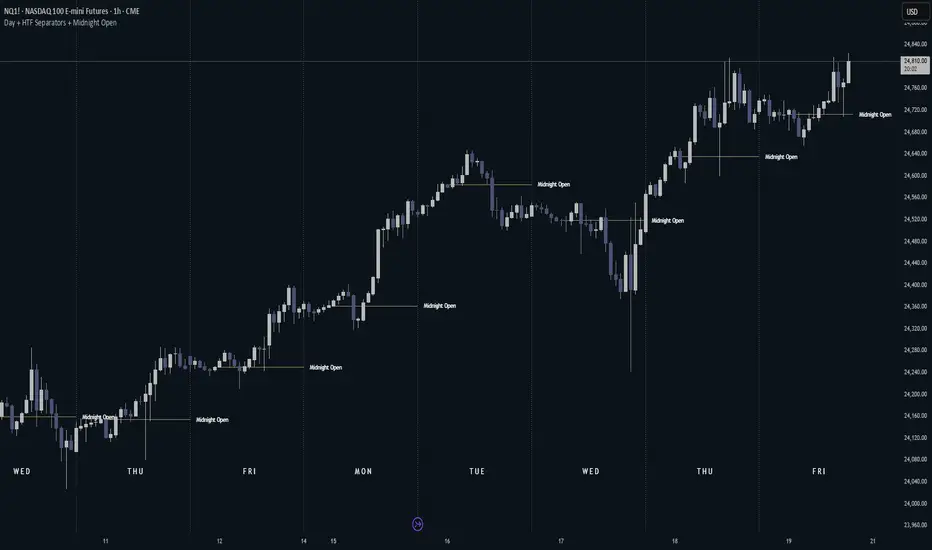
Day + HTF Separators + Midnight OpenOverview The Day + HTF Separators + Midnight Open indicator is a versatile and easy-to-use tool for traders who want to track key price levels and time-based market events. It draws vertical lines to mark the start of each day, 4-hour period, and 1-hour period, adds labels to show the day of the week, and plots a horizontal line at a customizable hourly open price (defaulting to midnight, referred to as the "Time-Designated Open" or TDO). This indicator is perfect for day traders, swing traders, and anyone analyzing price action in Futures, forex, cryptocurrencies, or other markets on TradingView. Designed for intraday charts (e.g., 1-minute, 5-minute, or 1-hour), this indicator offers extensive customization options, letting you toggle features, change colors, adjust line styles, and position labels. It’s built to be lightweight, ensuring smooth performance even on charts with lots of historical data. Key Features 1. Daily Separators What It Does: Draws a vertical line at the start of each new trading day to help you see daily boundaries clearly. How It Works: Places a vertical line at the beginning of each day, spanning the full price range of the opening moment. Lines extend across the chart, making it easy to spot daily transitions. Keeps up to 300 past daily lines visible, automatically managing older ones to stay within TradingView’s limits. Customization: Show/Hide: Always shown on intraday charts but tied to the "Show Days of Week Labels" setting for consistency. Color: Choose any color (default: a medium gray). Style: Pick Solid, Dashed, or Dotted lines (default: Dotted). Why Use It: Helps you track daily price ranges, identify daily open/close levels, and plan trades around daily market cycles. 2. Day of the Week Labels What It Does: Displays the day of the week (e.g., "MON" for Monday) at a specific hour each day, making it easy to know which day you’re analyzing. How It Works: Shows labels like "MON", "TUE", "WED", "THU", "FRI", "SAT", or "SUN" at the bottom of the chart. Labels appear at a user-chosen hour (default: 5:00 AM) each day. Only works on intraday charts (e.g., 5-minute or 1-hour). Customization: Show/Hide: Turn on/off with "Show Days of Week Labels" (default: on). Color: Set the label text color (default: dark gray). Hour: Choose any hour from 0:00 to 23:00 for label placement (default: 5:00 AM). Why Use It: Great for traders who need to track specific days for events like economic releases or to spot weekly patterns in price action. 3. 4-Hour Separators What It Does: Marks the start of each 4-hour period with a vertical line, ideal for aligning with higher timeframe trends. How It Works: Draws vertical lines every 4 hours, covering the price range of the starting moment. Lines extend across the chart for clear visibility. Stores up to 100 past 4-hour lines, reusing older ones for efficiency. Customization: Show/Hide: Enable/disable with "Show 4H Separator" (default: off). Color: Choose any color (default: gray, slightly transparent). Style: Select Solid, Dashed, or Dotted lines (default: Dotted). Why Use It: Perfect for swing traders or those combining intraday trading with 4-hour chart analysis, such as identifying key support or resistance levels. 4. 1-Hour Separators What It Does: Draws vertical lines to mark the start of each hour, helping short-term traders track hourly price movements. How It Works: Places a vertical line at the start of each hour, spanning the price range. Lines extend across the chart and support up to 100 historical lines. Customization: Show/Hide: Enable/disable with "Show 1H Separator" (default: off). Color: Pick any color (default: a light gray, slightly transparent). Style: Choose Solid, Dashed, or Dotted lines (default: Dotted). Why Use It: Ideal for scalpers or day traders focusing on hourly trends, session changes, or short-term price action. 5. Time-Designated Open (TDO) Lines What It Does: Plots a horizontal line at the opening price of a chosen hour (default: midnight, 00:00) each day, with an optional label to mark the price level, helping you track key price points across multiple days. How It Works: Draws a horizontal line at the open price of the selected hour (e.g., midnight) in your chosen timezone (default: New York time). Lines start at the chosen hour and extend to the current moment on the chart (or a few bars beyond, based on settings) or until 5:00 PM New York time (market close for Futures). Supports up to 100 past TDO lines, keeping historical opens visible for comparison. Adds a label (e.g., "TDO") at the end or start of the line, which is invisible by default due to full transparency. Lines and labels only appear if both the main toggle and TDO-specific toggle are enabled. Customization: Show/Hide Line and Label: Turn on/off with "Enable Candle Open Line/Label" and the TDO-specific toggle (both default: on). Show/Hide Label: Enable/disable the label separately with "Enable Candle Open Label" (default: on). Hour: Select any hour from 00:00 to 23:00 (default: 00:00). Label Text: Customize the label name (default: "TDO"). Line Color: Choose any color (default: light cyan). Line Style: Pick Solid, Dashed, or Dotted (default: Solid). Label Text Color: Set the label text color (default: gray, fully transparent). Label Background Color: Choose the label background color (default: black). Label Transparency: Adjust transparency for both label text and background (default: fully transparent, invisible). Label Size: Select Tiny, Small, Normal, or Large (default: Small). Label Position: Place the label at the right or left of the line with "Stick Label to Right" (default: right) and adjust spacing with "Label Padding" (default: 1 bar). Line Length: Shorten the left side with "Enable Left-Side Trimming" (default: off) and set the trim length with "Left Trim Bars" (default: 8 bars). Extend the right side with "Line Padding" (default: 2 bars). Timezone: Choose from New York, UTC, London, Paris, Tokyo, Shanghai, Singapore, or Sydney (default: New York). Max History: Set how many past TDO lines to show (default: 100). Multi-Day Plotting: Plots a TDO line for the chosen hour (e.g., 00:00) each day, based on historical data. Each line starts at the open price of that hour and extends to the current moment or 5:00 PM New York time (for Futures). Past TDO lines stay visible, letting you compare daily open prices over time (up to 100 days, adjustable). How to Use Add to Your Chart: Add the indicator to an intraday chart (e.g., 1-minute, 5-minute, or 1-hour) for any market (Futures, forex, crypto, etc.). It works best on intraday timeframes to show all features. Customize Settings: Open the settings panel in TradingView. Turn on/off features like daily separators, DOW labels, 1-hour/4-hour separators, or TDO lines. Adjust colors, line styles, and label positions to fit your chart’s look. Set the TDO hour (e.g., 00:00 for midnight or 03:00 for London open) and timezone to match your market. Make TDO labels visible by reducing "Label Transparency" or changing "Label Text Color" to an opaque color. Analyze the Chart: Use daily separators to spot daily price ranges and key levels. Check DOW labels to track specific days for trading events or weekly trends. Use 1-hour/4-hour separators to align with short-term or higher timeframe strategies. Monitor TDO lines to identify key opening price levels across days, useful for support/resistance or breakout trading. Test and Adjust: Toggle the main TDO switch or specific TDO toggle to hide/show the TDO line. Reduce "Label Transparency" to 0 or change "Label Text Color" to make TDO labels visible. Performance: The indicator is optimized to handle up to 300 daily lines, 100 4-hour lines, 100 1-hour lines, and 100 TDO lines, ensuring it runs smoothly on long charts. Markets: Best for intraday charts. The 5:00 PM New York close is designed for futures; switch to UTC for forex or crypto. Labels: TDO labels are invisible by default (fully transparent). Adjust "Label Transparency" or "Label Text Color" to make them visible. Time Context: As of September 17, 2025, 6:08 PM EDT, TDO lines on stock charts stop updating at 5:00 PM New York time. Use historical data or change the timezone for continuous markets. Limitations Only works on intraday charts (e.g., 1-minute to 1-hour). TDO lines stop at 5:00 PM New York time for Futures; adjust the timezone for 24/7 markets. TDO labels are hidden by default (fully transparent); change transparency or color to see them. Limited to 500 total lines and labels due to TradingView’s restrictions, managed automatically. Feedback If something isn’t working (e.g., missing lines or labels), please share: The market and timeframe (e.g., EUR/USD, 5-minute). Your settings (e.g., TDO hour, timezone, transparency). A description or screenshot of the issue. This indicator is designed to make your trading easier with clear visuals for time-based analysis. Happy trading!
Pine Script® インジケーター
optimum_blissの投稿
更新済
11
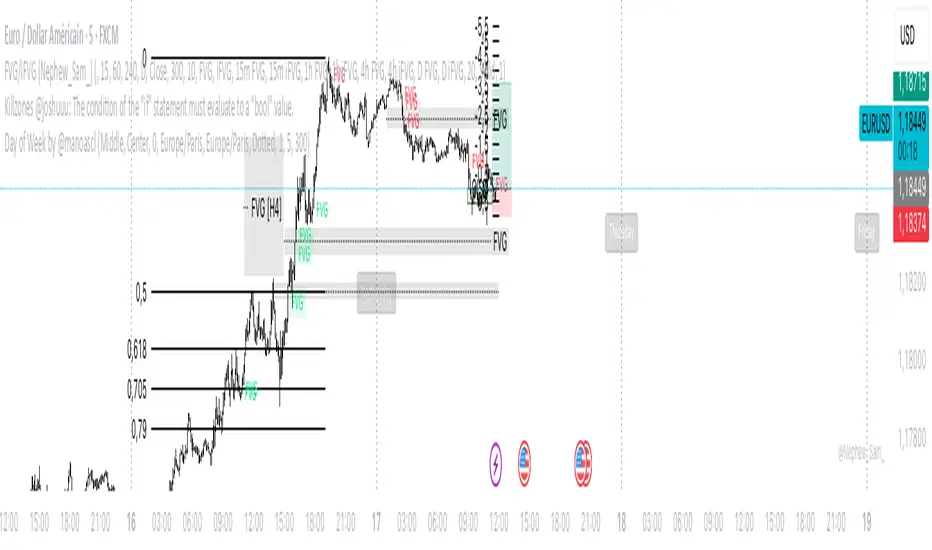
Day of Week by @manoascl Day of Week by @manoascl - version 1.8 One-line summary This indicator draws vertical lines and labels at 00:00 of your chosen timezone for selected weekdays, helping you see daily structure, spot recurring weekly patterns, and prepare for upcoming trading days. What it does Draws vertical lines at 00:00 (calendar midnight) of the selected timezone for chosen weekdays (Mon–Sun). Optionally adds a weekday label at the start of the day (top/middle/bottom alignment) with a user-defined offset in minutes. Maintains stable label Y-positions via a configurable lookback window. Projects future day markers (up to 30) in the same style, optionally filtering to your selected weekdays. Fully customizable visuals: line color/width/style (solid/dashed/dotted), label background and text colors, label anchoring. How it works (concepts & calculations) Day boundary (midnight): Computes dayStartTz = timestamp(timezone, year, month, day, 0, 0, 0) so the boundary is true calendar midnight for the selected TZ. Day change detection: Uses ta.change(dayStartTz) != 0 to detect the first bar of a new day (non-repainting). Weekday naming: Determines the weekday using a midday shift (+12h) to avoid edge effects near midnight. Drawing: When the weekday passes your filter, draws a vertical line (high→low) and an optional label positioned at the start of the day. Future projection (DST-safe): Rebuilds future markers with timestamp(timezone, Y, M, D + k, 0, 0, 0) so daylight-saving transitions don’t drift. Stability: Top/middle/bottom label Y-levels are derived from ta.highest/ta.lowest over a user lookback, preventing jitter. How to use it Add the indicator to your chart. In Timezone, pick your region (or choose Custom and type an IANA TZ like Pacific/Tahiti). Select the weekdays to display (e.g., only trading days, highlight Mondays, etc.). Choose label position (top/middle/bottom), anchor (left/center/right), and set a minute offset if you want labels slightly inside the day. Enable future projection to see upcoming day starts for planning around key weekdays (FOMC Wednesdays, NFP Fridays). Tweak line style/width and colors to match your chart theme. Practical applications for traders Intraday: Instantly see where each local-time day begins; segment your session analysis cleanly. Swing: Emphasize recurring weekdays (e.g., Monday opens, Friday profit-taking). Event-driven: Pre-mark news-heavy weekdays and preview them with future projection. Pattern studies: Compare behavior by weekday (range expansion, reversals, gaps) with consistent local-time boundaries. Limitations Visual aid only; no trading signals are generated. Timezone must be chosen explicitly; if you pick a TZ different from your chart’s display, lines will follow the selected TZ by design. Market holidays and custom sessions are not detected; lines still mark calendar midnight even if the market is closed. On very small timeframes and long histories, many objects can impact performance—reduce lookback or future count if needed. This work is licensed under a Attribution-NonCommercial-ShareAlike 4.0 International (CC BY-NC-SA 4.0) creativecommons.org © @manoascl
Pine Script® インジケーター
manoasclの投稿
ICT NDOG/NWOGICT NDOG / NWOG — Opening Gap Visualizer Plots daily (NDOG) and weekly (NWOG) opening gaps. An opening gap is the price range between the previous close and the new session’s open. Features: • Optional border lines at gap high/low. • Optional Consequent Encroachment line (50%). • Optional Quadrant lines (25% and 75%). • Color customization • Custom NDOG and NWOG amount (separated) *Also included in ICT ULT (All In One) Indicator *Feel free to suggest improvement in the comments
Pine Script® インジケーター
mats42の投稿
22
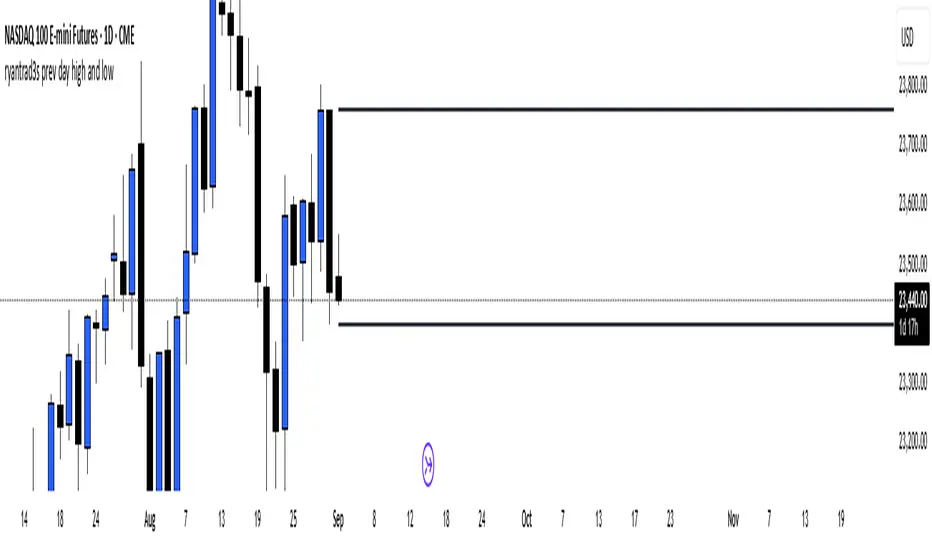
ryantrad3s prev day high and lowThis indicator can help you find the Daily high and low a lot faster than what it usually does, having this indicator equipped will make it a lot more convenient for any trader that uses anything to do with Daily highs and lows. Hope this helps.
Pine Script® インジケーター
ryantrad3sの投稿
Previous Day/Week High, Low, Midpoint LinesI put together this script as I couldn’t find exactly what I was looking for on Tradingview. The script plots the previous day and week high and low as well as the midpoint of the range between the daily and weekly high and low. These lines stop printing once a price candle crosses the lines. This may be of use to you. Enjoy!
Pine Script® インジケーター
ScalpTheTickerの投稿
11
11223344
…999999

市場データ提供: ICE Data Services.参照データ提供元: FactSet. Copyright © 2026 FactSet Research Systems Inc.Copyright © 2026, American Bankers Association. CUSIPデータベース提供元: FactSet Research Systems Inc. All rights reserved. SEC提出書類およびその他ドキュメント提供元: Quartr.© 2026 TradingView, Inc.

主要プロダクト
  • スーパーチャート
スクリーナー
  • 株式
  • ETF
  • 債券
  • 暗号コイン
  • CEXペア
  • DEXペア
  • Pine
ヒートマップ
  • 株式
  • ETF
  • 暗号コイン
カレンダー
  • 経済
  • 決算
  • 配当
その他プロダクト
  • イールドカーブ
  • オプション
  • マクロマップ
  • ニュースフロー
  • Pine Script®
アプリ
  • モバイル
  • デスクトップ
コミュニティ
  • ソーシャルネットワーク
  • ラブウォール
  • お友達紹介
  • ハウスルール
  • モデレーター
アイデア
  • トレーディング
  • 教育
  • エディターズピック
Pine Script
  • インジケーターとストラテジー
  • 魔術師
  • フリーランサー
ツールとサブスクリプション
  • 機能
  • 価格
  • マーケットデータ
  • プランを贈る
トレーディング
  • 概要
  • トップブローカー
  • Brokers comparison
スペシャルオファー
  • CMEグループ先物
  • Eurex先物
  • 米国株バンドルデータ
会社情報
  • 私たちについて
  • スペースミッション
  • ブログ
  • キャリア
  • メディアキット
商品
  • TradingViewストア
  • タロットカード
  • C63 TradeTime
ポリシーとセキュリティ
  • 利用規約
  • 免責事項
  • プライバシーポリシー
  • Cookieポリシー
  • アクセシビリティ宣言
  • セキュリティのヒント
  • バグバウンティ・プログラム
  • ステータスページ
ビジネスソリューション
  • ウィジェット
  • チャートライブラリ
  • Lightweight Charts™
  • アドバンスドチャート
  • トレードプラットフォーム
成長機会
  • 広告
  • ブローカーシステムの統合
  • パートナープログラム
  • 教育プログラム
コミュニティ
  • ソーシャルネットワーク
  • ラブウォール
  • お友達紹介
  • ハウスルール
  • モデレーター
アイデア
  • トレーディング
  • 教育
  • エディターズピック
Pine Script
  • インジケーターとストラテジー
  • 魔術師
  • フリーランサー
ビジネスソリューション
  • ウィジェット
  • チャートライブラリ
  • Lightweight Charts™
  • アドバンスドチャート
  • トレードプラットフォーム
成長機会
  • 広告
  • ブローカーシステムの統合
  • パートナープログラム
  • 教育プログラム
Look FirstLook First