Position Size CalculatorSet TP SL and entry point, over any chart to follow the points without drawing lines
バンドとチャネル

Color EMA (Green Above, Red Below)olor EMA (Green Above, Red Below) is a simple yet effective trend-visualization tool that colors the Exponential Moving Average (EMA) based on price position.
When the close is above the EMA, the line turns green, indicating bullish strength.
When the close is below the EMA, the line turns red, indicating bearish pressure.

PolarLabs Indicator Pro P3PolarLabs Indicator Pro — Introduction
PolarLabs is a research collective dedicated to the advancement of quantitative trading and automation. We focus on all-weather portfolio strategies, diverse grid trading systems, and perpetual futures, aiming to empower traders and investors with streamlined, efficient, and innovative tools for the modern financial markets.
The PolarLabs Indicator now features enhanced capabilities including:
• Automatic detection of recent resistance ("Arctic Line") and support ("Antarctic Line") levels
• Advanced V-Average pricing with dynamic trend analysis
• Dual Momentum indicators (A-Momentum & T-Momentum) for market strength assessment
• IceFire Meter for real-time volume flow visualization
• Trend Follow Mode with Fibonacci-based entry bands for proactive position management
• Linear Regression Volume Distribution for smart accumulation zone identification
All key metrics are displayed in a clear, accessible dashboard on your chart, making it easy for quant enthusiasts and algorithmic traders to analyze market structures, identify key zones, and execute strategies with enhanced confidence.
Our tools are designed to complement your trading intuition - providing data-driven insights while respecting the art of market interpretation. Whether you're building automated grid systems, monitoring breakouts, or constructing all-weather portfolios, PolarLabs provides practical solutions to help you trade and analyze more effectively.
If you are interested, please send me a private message
X: X.com/PolarLabs_ai
TG: t.me/PolarLabs_ai
Follow us for more quant tools and automated trading strategies!
———————————————————————————————————————
北极熊指标Pro — 简介
北极熊研究所(PolarLabs)专注于量化交易和自动化策略的研究与创新。我们致力于开发全天候资产配置策略、各种网格交易系统以及永续合约解决方案,帮助更多热爱量化与自动化的交易员轻松高效地进行市场分析与策略执行。
北极熊指标现已升级增强功能:
• 自动侦测近期「北极线」(压力线)与「南极线」(支撑线)
• V均價动态趋势分析系统
• 双动能指标(A动能 & T动能)评估市场强度
• 冰火仪实时成交量流向可视化
• 趋势追踪模式配合斐波那契入场带,主动管理仓位
• 线性回归加量分布,智能识别筹码积累区域
所有关键数据均在图表右上角以面板形式直观展示,为您的交易分析提供有力支持。我们的工具旨在增强您的交易直觉——在提供数据驱动洞察的同时,尊重市场解读的艺术。
无论是箱体震荡、网格套利、趋势跟踪还是全自动量化策略,北极熊指标都能为您的交易决策提供深度市场结构分析。
【仅限受邀使用 - 需私人访问权限】
有兴趣请私信我查询
X: X.com/PolarLabs_ai
TG: t.me/PolarLabs_ai
欢迎关注 PolarLabs,获取更多量化与自动化工具和策略!

Moving Average Band StrategyOverview
The Moving Average Band Strategy is a fully customizable breakout and trend-continuation system designed for traders who need both simplicity and control.
The strategy creates adaptive bands around a user-selected moving average and executes trades when price breaks out of these bands, with advanced risk-management settings including optional Risk:Reward targets.
This script is suitable for intraday, swing, and positional traders across all markets — equities, futures, crypto, and forex.
Key Features
✔ Six Moving Average Types
Choose the MA that best matches your trading style:
SMA
EMA
WMA
HMA
VWMA
RMA
✔ Dynamic Bands
Upper Band built from MA of highs
Lower Band built from MA of lows
Adjustable band offset (%)
Color-coded band fill indicating price position
✔ Configurable Strategy Preferences
Toggle Long and/or Short trades
Toggle Risk:Reward Take-Profit
Adjustable Risk:Reward Ratio
Default position sizing: % of equity (configurable via strategy settings)
Entry Conditions
Long Entry
A long trade triggers when:
Price crosses above the Upper Band
Long trades are enabled
No existing long position is active
Short Entry
A short trade triggers when:
Price crosses below the Lower Band
Short trades are enabled
No existing short position is active
Clear entry markers and price labels appear on the chart.
Risk Management
This strategy includes a complete set of risk-controls:
Stop-Loss (Fixed at Entry)
Long SL: Lower Band
Short SL: Upper Band
These levels remain constant for the entire trade.
Optional Risk:Reward Take-Profit
Enabled/disabled using a toggle switch.
When enabled:
Long TP = Entry + (Risk × Risk:Reward Ratio)
Short TP = Entry – (Risk × Risk:Reward Ratio)
When disabled:
Exits are handled by reverse crossover signals.
Exit Conditions
Long Exit
Stop-Loss Hit (touch-based)
Take-Profit Hit (if enabled)
Reverse Band Crossover (if TP disabled)
Short Exit
Stop-Loss Hit (touch-based)
Take-Profit Hit (if enabled)
Reverse Band Crossover (if TP disabled)
Exit markers and price labels are plotted automatically.
Visual Tools
To improve clarity:
Upper & Lower Band (blue, adjustable width)
Middle Line
Dynamic band fill (green/red/yellow)
SL & TP line plotting when in position
Entry/Exit markers
Price labels for all executed trades
These are built to help users visually follow the strategy logic.
Alerts Included
Every trading event is covered:
Long Entry
Short Entry
Long SL / TP / Cross Exit
Short SL / TP / Cross Exit
Combined Alert for webhook/automation (JSON-formatted)
Perfect for algo trading, Discord bots, or automation platforms.
Best For
This strategy performs best in:
Trending markets
Breakout environments
High-momentum instruments
Clean intraday swings
Works seamlessly on:
Stocks
Index futures
Commodities
Crypto
Forex
⚠️ Important Disclaimer
This script is for educational purposes only.
Trading involves risk. Backtest results are not indicative of future performance.
Always validate settings and use proper position sizing.

Gerchik Auto Levels Simple v2 (multi TF + alerts)📘 Описание индикатора: Gerchik Auto Levels Simple
Индикатор автоматически строит ключевые уровни поддержки и сопротивления по выбранному таймфрейму и отслеживает взаимодействие цены с этими уровнями в режиме реального времени.
🧩 1. Как работает индикатор
Индикатор берёт данные с одного выбранного таймфрейма:
5 минут
15 минут
1 час
4 часа
День
На этом таймфрейме он анализирует ключевые сигналы, которые формируют важные уровни:
✓ Пивоты (Pivot High / Pivot Low)
Изломы рынка, где цена сделала значимый локальный максимум или минимум.
✓ Ложные пробои (False Breakout / ЛП)
Ситуации, когда цена обновила хай/лоу, но закрылась обратно — классика Герчика.
✓ Паранормальные бары (PB)
Сильные импульсные бары с хвостом и расширенным диапазоном:
хвост больше тела wickFactor раз
диапазон больше ATR atrFactor
🎯 2. Построение уровней
Для каждого найденного сигнала индикатор создаёт уровень:
уровни, расположенные близко друг к другу, объединяются в один (clustering)
используется параметр mergeTicks — допустимое расстояние в тиках
у каждого уровня есть сила (score): пивот > ложный пробой > паранормал
максимальное количество уровней регулируется параметром maxLevels
Если уровней больше лимита:
удаляется самый слабый
вместо него добавляется новый
🎨 3. Отображение уровней
Уровни автоматически окрашиваются:
красный — сопротивление (уровень выше текущей цены)
зелёный — поддержка (уровень ниже текущей цены)
Линии тянутся вправо на весь график (extend.both).
🚨 4. Типы алертов
Индикатор отслеживает каждое взаимодействие цены с уровнями и генерирует 5 типов сигналов:
1) Касание уровня (Touch)
Цена касается уровня тенями (low <= lvl <= high).
2) Подход к уровню (Near)
Цена приближается к уровню на расстояние X% (параметр alertNearPct).
3) Пробой вверх (Breakout Up)
Бар закрывается выше уровня.
4) Пробой вниз (Breakout Down)
Бар закрывается ниже уровня.
5) Ретест после пробоя (Retest)
Классический ретест Герчика:
сначала пробой вверх/вниз;
затем касание уровня;
затем закрытие в сторону пробоя.
Каждый тип можно выбрать отдельно в настройках алертов TradingView.
⚙️ 5. Основные параметры
srcTf — таймфрейм анализа уровней
leftBars / rightBars — жёсткость пивотов
mergeTicks — объединение уровней
maxLevels — максимальное количество уровней
atrLen / atrFactor — параметры паранормалов
wickFactor — чувствительность хвоста
alertNearPct — чувствительность подхода к уровню
resColor / supColor — цвета уровней
🧠 6. Для чего нужен индикатор
Этот инструмент полностью автоматизирует подход Герчика:
Находит только те уровни, которые действительно значимы
Очищает рынок от “шума” слабых экстремумов
Постоянно обновляется по мере формирования новых уровней
Даёт моментальные сигналы о взаимодействии цены с уровнями
Работает на любом инструменте (форекс, крипта, акции, фьючи).
📘 Indicator Description: Gerchik Auto Levels Simple
The indicator automatically identifies and plots key support and resistance levels based on a selected timeframe, combining several professional market signals commonly used in price-action and Gerchik-style trading.
🧩 1. How the Indicator Works
The indicator analyzes one selected timeframe:
5 minutes
15 minutes
1 hour
4 hours
1 day
On this timeframe it detects major structural events that create meaningful market levels:
✓ Pivot High / Pivot Low
Significant swing points where price forms a local top or bottom.
✓ False Breakouts (Fakeouts / FB / LP)
When price breaks the previous high/low but closes back inside.
This is one of the core concepts in Alexander Gerchik's methodology.
✓ Paranormal Bars (PB)
Strong impulse bars with extended wicks and unusually large range:
wick > body × wickFactor
range > ATR × atrFactor
🎯 2. Level Creation Logic
For each detected signal, the indicator generates a level:
close levels are automatically clustered into one using mergeTicks
each level has a strength score:
pivot > false breakout > paranormal bar
levels are stored, updated, and filtered dynamically
The total number of displayed levels is limited by the parameter maxLevels
(e.g., only the top 10 strongest levels will remain).
When maxLevels is reached:
the weakest level is removed,
the new level replaces it.
If a level already exists nearby:
the price is averaged,
the score is strengthened up to a maximum of 10.
🎨 3. Visual Representation
Levels are color-coded based on their relation to current price:
red — resistance (level above the current price)
green — support (level below the current price)
All levels extend across the entire chart (extend.both) for long-term visibility.
🚨 4. Alert System
The indicator supports five types of alerts, allowing traders to react instantly to market structure events:
1) Level Touch
The price touches a level using candle wicks
(low <= level <= high)
2) Level Near
The price approaches a level within a user-defined percentage
(alertNearPct)
3) Breakout Up
The candle closes above the level.
4) Breakout Down
The candle closes below the level.
5) Retest After Breakout
A classic Gerchik-style retest:
level is broken
price returns to it
candle closes back in the breakout direction
This confirms the validity of the breakout and often signals a high-quality entry point.
Each alert type can be selected and used independently inside TradingView’s alert settings.
⚙️ 5. Main Parameters
srcTf — timeframe for level detection
leftBars / rightBars — pivot sensitivity
mergeTicks — merge distance for clustering levels
maxLevels — maximum number of stored and displayed levels
atrLen / atrFactor — ATR settings for paranormal bars
wickFactor — wick/body ratio sensitivity
alertNearPct — sensitivity for "near" alerts
resColor / supColor — resistance/support colors
🧠 6. What This Indicator Solves
This tool fully automates the Gerchik-style level approach:
Finds only meaningful support/resistance levels
Filters out noise and weak local highs/lows
Adapts in real time as the market prints new structure
Provides immediate alerts for touches, approaches, breakouts, and retests
Works on any market (Forex, Crypto, Stocks, Futures)

EMA VIP STRThis strategy works on EMAS and standard deviation on both sides , the tp is decided on RSI levels. the strategy is a systematic trading setup
Closing Price Donchian Channels//@version=5
indicator("Closing Price Donchian Channels", overlay=true)
// Input parameters
length = input.int(20, "Period", minval=1)
showMid = input.bool(true, "Show Middle Line")
// Calculate upper and lower bands based on closing prices
upper = ta.highest(close, length)
lower = ta.lowest(close, length)
mid = (upper + lower) / 2
// Plot the bands
upperBand = plot(upper, "Upper Band", color=color.rgb(0, 184, 222))
lowerBand = plot(lower, "Lower Band", color=color.rgb(0, 184, 222))
midLine = plot(showMid ? mid : na, "Middle Line", color=color.rgb(209, 212, 220))
// Fill the area between bands
fill(upperBand, lowerBand, color=color.rgb(0, 184, 222, 90), title="Channel Fill")

Closing Price Donchian Channels Rayner//@version=5
indicator("Closing Price Donchian Channels", overlay=true)
// Input parameters
length = input.int(20, "Period", minval=1)
showMid = input.bool(true, "Show Middle Line")
// Calculate upper and lower bands based on closing prices
upper = ta.highest(close, length)
lower = ta.lowest(close, length)
mid = (upper + lower) / 2
// Plot the bands
upperBand = plot(upper, "Upper Band", color=color.rgb(0, 184, 222))
lowerBand = plot(lower, "Lower Band", color=color.rgb(0, 184, 222))
midLine = plot(showMid ? mid : na, "Middle Line", color=color.rgb(209, 212, 220))
// Fill the area between bands
fill(upperBand, lowerBand, color=color.rgb(0, 184, 222, 90), title="Channel Fill")

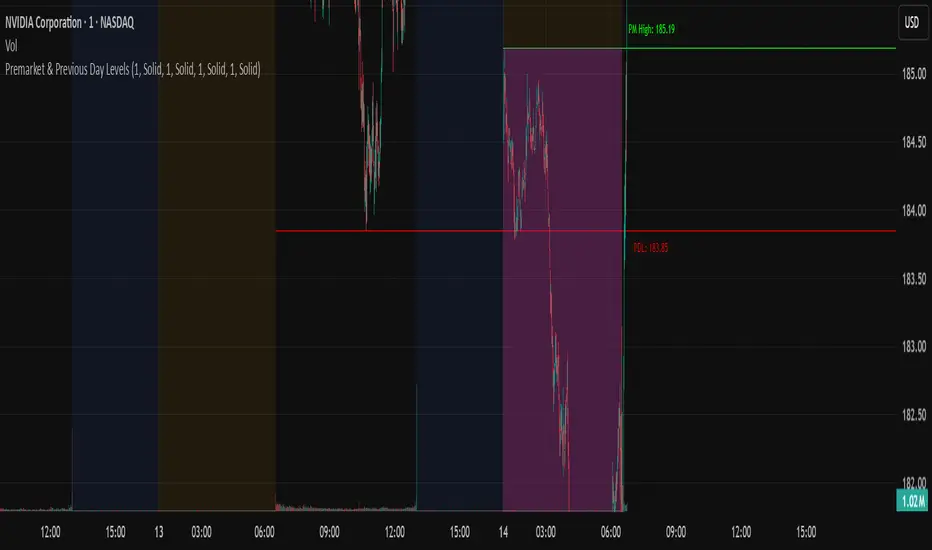
N Pops Premarket & Previous Day LevelsPrevious day high low, premarket high low, higher than previous high and lower than previous low
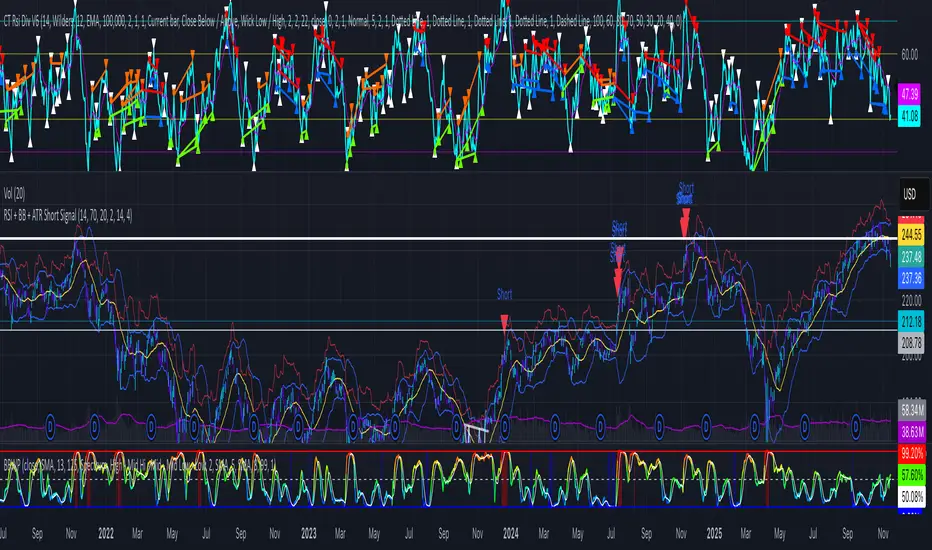
RSI + BB + ATR Short SignalThis indicator highlights potential short setups by combining three conditions:
RSI Overbought – RSI must be above the user-defined level.
Bollinger Band Break – Price must close above the upper Bollinger Band.
Extended Above the 5-Day Low – Price must sit at least X ATR above the recent 5-day low.
When all conditions line up on the same bar, the script plots a red triangle above the candle and triggers an alert so you can act immediately.
To help visualise the setup, the script also plots the full Bollinger Bands (upper, middle, lower) and a line showing the threshold of 5-day-low + ATR × multiplier. You can adjust RSI length and level, Bollinger settings, ATR length, and the ATR multiplier.
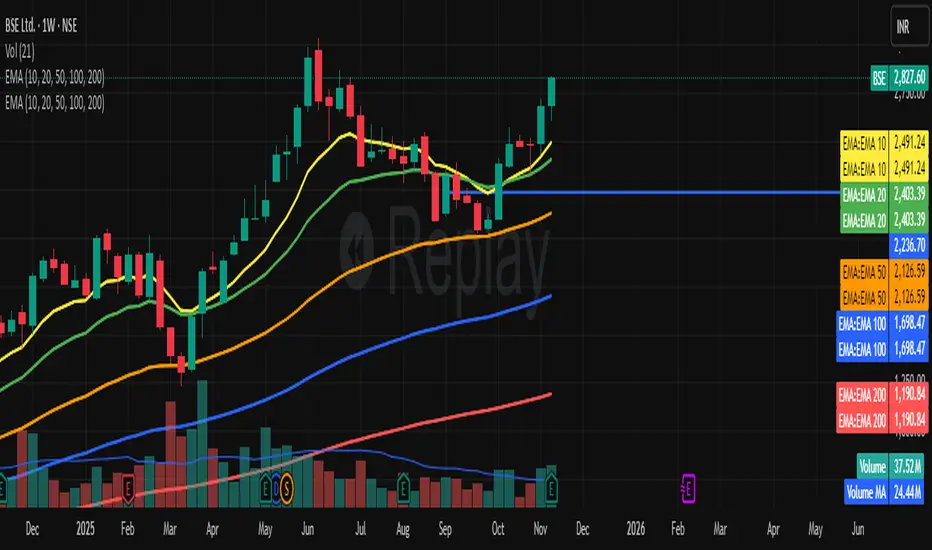
EMA Channel EMA Channel
All EMAs in single indicator
Customizable inputs
Clean color scheme
Works for any timeframe
Ideal for trend, pullback & momentum trading
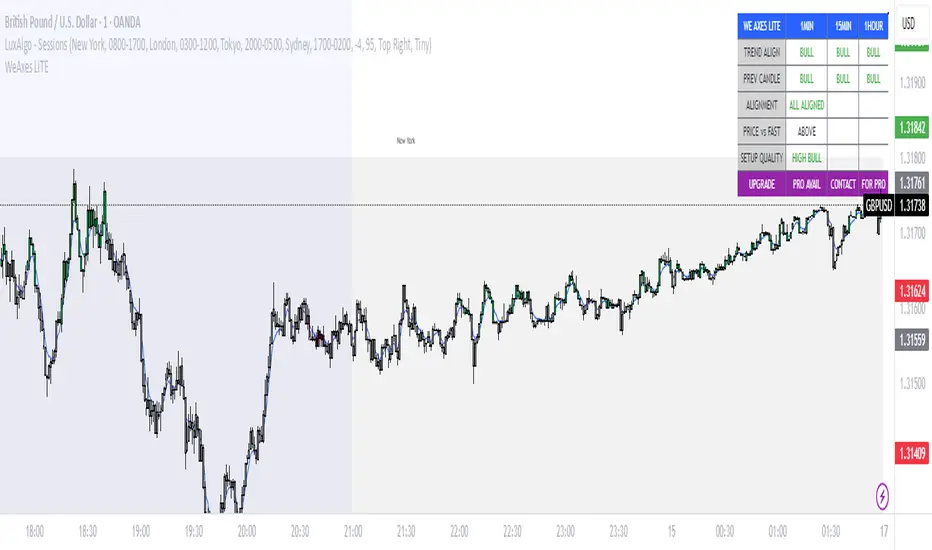
WeAxes MTF Scalper [LITE] WeAxes MTF Scalper
Professional Multi-Timeframe Alignment Tool - LITE Version
What This LITE Version Offers:
3-Timeframe Sync: Monitor 1min, 15min, and 1hr trends simultaneously
Visual Alignment System: Color-coded candles for perfect setups
Quick Setup Recognition: Instant HIGH/MEDIUM/LOW quality ratings
Clean Data Display: Essential alignment information at a glance
Perfect for Scalping:
Green Candles: Perfect bullish alignment across all timeframes
Red Candles: Perfect bearish alignment across all timeframes
Setup Quality: Know immediately if conditions are favorable
Multi-Timeframe Context: Never trade blind again
How to Use:
1. HIGH Quality Setups (Green/Red candles): Highest probability trades
2. MEDIUM Quality: All trends aligned, good for trend following
3. LOW Quality: Mixed signals, better to wait for alignment
PRO Version Includes:
- Advanced volume profiling across all timeframes
- Momentum strength calculations
- Detailed market structure analysis
- Smart Money Concepts integration
- Complete volume analysis
- And much more...
This LITE version gives you a taste of professional multi-timeframe analysis. Contact for PRO version access with full features.
Disclaimer: Use proper risk management. This tool assists analysis but doesn't guarantee profits.
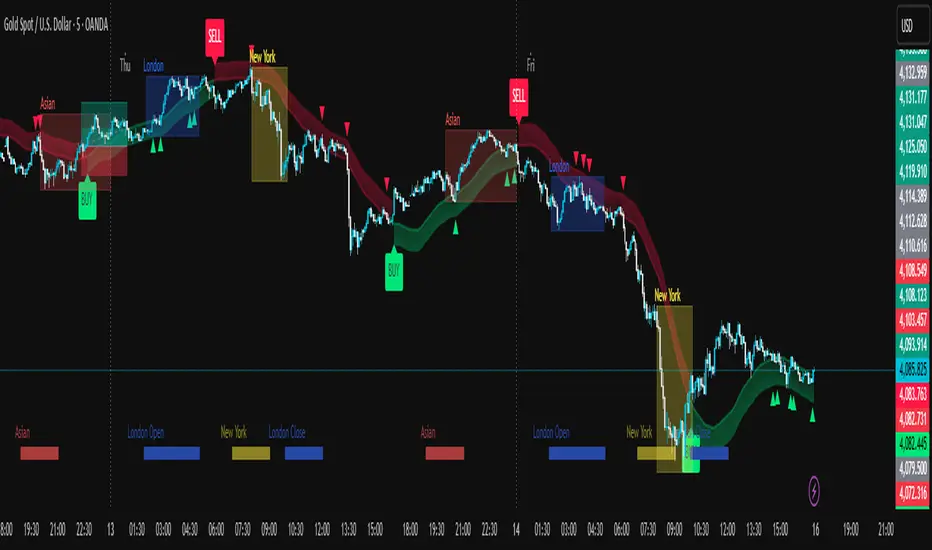
掘金社趋势线
**趋势线**
1. **画法**:连接两个以上连续升高低点(上升线)或连续降低高点(下降线)。
2. **用法**:识别趋势方向、动态支撑/阻力位。价格回测趋势线时是潜在交易机会;有效突破/跌破可能预示趋势反转。
3. **原则**:触点越多越有效;避免强行拟合价格。
**斜率线**
1. **画法**:与趋势线画法相同,但更关注倾斜角度。
2. **用法**:衡量趋势强度。斜率陡峭表强势但可能不稳定;斜率平缓趋势更稳健;斜率放缓(动能背离)是潜在反转信号。
---
### English Version
**Key Uses of Trend Lines & Slope Lines**
**Trend Line**
1. **Drawing**: Connect two or more consecutive higher lows (uptrend) or lower highs (downtrend).
2. **Usage**: Identify trend direction and dynamic support/resistance. A price retest of the line offers a potential trading opportunity; a decisive break signals a potential trend reversal.
3. **Principle**: The more times the price touches the line, the more valid it is; avoid overfitting the price action.
**Slope Line**
1. **Drawing**: Same as a trend line, but with a focus on the angle of inclination.
2. **Usage**: Gauge trend strength. A steep slope indicates strong momentum but may be unsustainable; a gentle slope suggests a more stable trend; a slowing slope (momentum divergence) signals a potential reversal.

掘金社通道线Of course. Here is the English translation of the provided text about Linear Regression Channels.
***
**1. Basic Components of the Linear Regression Channel**
The Linear Regression Channel consists of five parts: the regression line, the upper and lower channel lines, the regression confirmation zone, and the regression forecast zone.
* The **regression line** forms the central axis, created through the linear regression analysis of stock prices.
* The **upper and lower channel lines** indicate the support and resistance levels of the stock price.
* The **confirmation zone** and **forecast zone** are used to determine the start/end distance for analysis and to estimate the future price range, respectively.
**2. How to Draw the Linear Regression Channel**
* Determine two anchor points to define the scope of the time period.
* Within this range, draw a line segment—the regression line—that minimizes the sum of the squared lengths of the perpendicular distances from all price points to the line.
* Draw two lines parallel to the regression line, one passing through the highest price and the other through the lowest price within the selected period, forming the linear regression channel.
* Extend these three parallel lines to the right, typically as dashed lines, to form the complete Linear Regression Channel.
**3. Application Principles of the Linear Regression Channel**
* The length of the regression channel, once determined by the two anchor points, should not be changed arbitrarily. However, when the trend line changes significantly, the channel needs to be redrawn.
* In an **uptrend**:
* When the price breaks above the upper channel line, it is expected to surge and then pull back.
* When the price falls back to the regression line, it is expected to find support and bounce.
* When the price breaks below the regression line, it is a sell signal.
* When the price breaks below the lower channel line, it is a stop-loss signal.
* In a **downtrend**, the application principles are the opposite of those in an uptrend.

Consolidation Tracker🧭 Consolidation Tracker — Visualize Market Reversals in Real Time
The Consolidation Tracker is a minimalist yet powerful tool designed to map the anatomy of market reversals and trend transitions. It highlights the structural evolution of price through four key phases, helping traders anticipate shifts with clarity and confidence.
🔄 The Four Stages of a Market Reversal:
Failure to Displace — Price fails to break beyond recent highs or lows, signaling potential exhaustion of the current trend.
Consolidation (CAMP) — A range-bound phase where price compresses between a dynamic high and low. These zones are shaded gray, representing indecision and balance.
Engulfing (ENGULF) — A decisive candle closes beyond the CAMP high or low, suggesting a directional shift. These are highlighted in orange.
Fair Value Gap (FVG) — A three-candle pattern forms a price imbalance. If this FVG also engulfs the CAMP range, it confirms the reversal and resets the CAMP. Bullish FVGs are shaded green, bearish FVGs in red.
🔁 From Reversal to Trend:
Once a reversal is confirmed via an FVG, the market often transitions into a trend cycle characterized by:
Displacement — Strong directional movement away from the prior range.
Fair Value Gaps — Continuation imbalances that offer high-probability entries on retracements.
🧠 How It Works:
The indicator dynamically tracks CAMP highs and lows, updating only when a candle engulfs the range or a valid FVG forms.
FVGs are detected when a three-candle sequence creates a gap between candle 2 and 0, and the middle candle (candle 1) breaks the CAMP boundary.
CAMP levels are plotted as horizontal lines, while background colors narrate the evolving structure in real time.
This tool is ideal for traders who value market structure, price efficiency, and narrative clarity. Whether you're anticipating reversals or riding trends, the Consolidation Tracker offers a clean, actionable lens into price behavior.

8-12 wk Consolidation → Upside Breakout [sijoittaja.fi]This Screener looks for stocks that are about to break out after 8-12 weeks of consolidation. The code was developed using GROK, and there are no guarantees that the code will work.

TNT TRADER MARKET ClOSEVertical Line of red showing the New York market close. Color and time can be changed

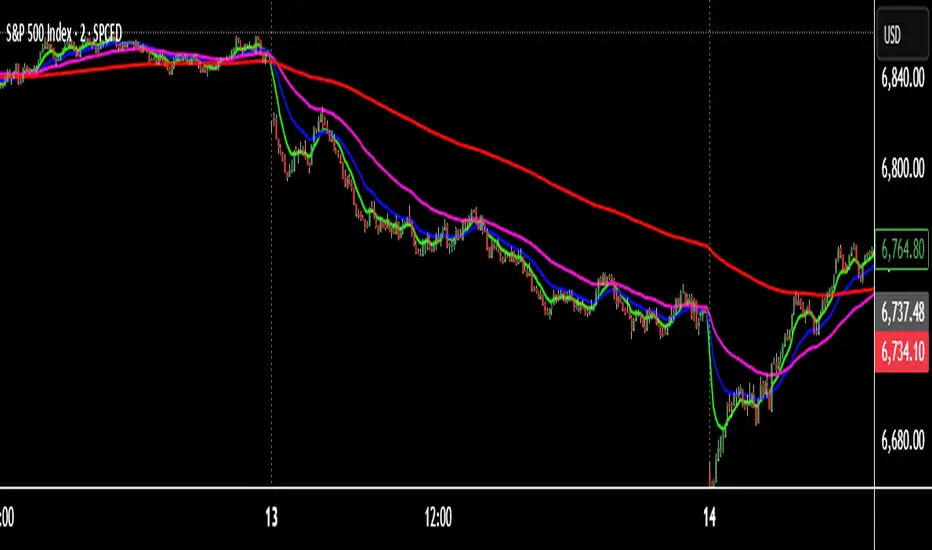
TNT TRADER EMA FANEMA fan of 8 20 50 200, very simple and straight forward with color change options.
Fractional Candlestick Long Only Experimental V10Fractional Candlestick Long-Only Strategy – Technical Description
This document provides a professional English description of the "Fractional Candlestick Long Only Experimental V6" strategy using pure CF/AB fractional kernels and wavelet-based filtering.
1. Fractional Candlesticks (CF / AB)
The strategy computes two fractional representations of price using Caputo–Fabrizio (CF) and Atangana–Baleanu (AB) kernels. These provide long-memory filtering without EMA approximations. Both CF and AB versions are applied to O/H/L/C, producing fractional candlesticks and fractional Heikin-Ashi variants.
2. Trend Stack Logic
Trend confirmation is based on a 4-component stack:
- CF close > AB close
- HA_CF close > HA_AB close
- HA_CF bullish
- HA_AB bullish
The user selects how many components must align (4, 3, or any 2).
3. Wavelet Filtering
A wavelet transform (Haar, Daubechies-4, Mexican Hat) is applied to a chosen source (e.g., HA_CF close). The wavelet response is used as:
- entry filter (4 modes)
- exit filter (4 modes)
Wavelet modes: off, confirm, wavelet-only, block adverse signals.
4. Trailing System
Trailing stop uses fractional AB low × buffer, providing long-memory dynamic trailing behavior. A fractional trend channel (CF/AB lows vs HA highs) is also plotted.
5. Exit Framework
Exit options include: stack flip, CF

Turtle Long & Short (Donchian + N-Stop). Overview and Core Functionality
The indicator implements the classic Turtle Trading System rules. It uses two sets of Donchian Channels for generating entry and exit signals, and the Average True Range (ATR), referred to as N, to calculate a dynamic, volatility-adjusted initial stop-loss.
The script simulates a position's life cycle (entry, holding the fixed initial stop, and exiting) and only conditionally displays the calculated initial stop-loss price on the chart when a trade signal is active.
2. Key Input Parameters (Adjustable Settings)
The script provides detailed input groups for customization:
A. Signal Settings:
len_entry (Default: 20): Period for the Entry Donchian Channel (20-day high/low breakout).
len_exit (Default: 10): Period for the Exit Donchian Channel (10-day low/high trailing stop).
B. Risk Settings (N):
len_atr (Default: 20): Period used to calculate the Average True Range (N), which determines volatility.
stop_loss_multiplier (Default: 2.0): The factor applied to N to calculate the initial stop-loss (e.g., 2.0×N=2N).
C. Label Display: Controls the appearance of the entry labels.
label_background_color_long / label_background_color_short: Background color for Long/Short entry labels.
label_text_color: Text color for the labels.
label_size_input: Size control for the label (tiny, small, normal, large, huge).
3. Trading Logic and State Management
A. Entry and Exit Conditions
Trade Type Entry Condition Trailing Exit Condition Stop-Loss (SL)
Long Close > 20-period High Close < 10-period Low Fixed Entry Price−(Multiplier×N)
Short Close < 20-period Low Close > 10-period High Fixed Entry Price+(Multiplier×N)
In Google Sheets exportieren
B. Position State Management
The script uses persistent var float variables (fixed_long_stop_price and fixed_short_stop_price) to maintain the state:
Upon an Entry signal, the calculated stop-loss price is fixed and assigned to the respective var variable.
The variable holds this fixed price on subsequent bars.
The price is reset to na (Not Applicable) only when an Exit condition (10-period trailing exit, fixed stop-loss hit, or reverse entry signal) is met.
This logic ensures the initial stop-loss line is plotted only when a simulated trade is active.
4. Visual Elements and Alerts
Donchian Channels: Plotted as two lines (Entry High/Exit Low) with a fill for visualization.
N-Stop-Loss Lines: Two lines (fixed_long_stop_price in Fuchsia and fixed_short_stop_price in Orange) are plotted using plot.style_linebr, ensuring they appear only after a trade signal fires and disappear on exit.
Signal Shapes (plotshape):
Long Entry: Green triangle below the bar.
Short Entry: Red triangle above the bar.
Long/Short Exits: Diamond shapes indicating the trailing stop exit.
Entry Labels (label.new): Custom-colored labels appear at the point of entry, displaying the current N value and the exact calculated N-Stop price.
Alerts (alertcondition): Alerts are set up for both Long Entry and Short Entry conditions.

Absorption — Bullish or BearishAbsorption — Bullish or Bearish Only is a lightweight and minimalistic tool designed to identify pure absorption events in the market.
It highlights only two conditions:
Bullish Absorption
• Volume spike
• Small candle body
• Positive delta behavior (close > open)
→ Indicates potential buy-side absorption at lows
Bearish Absorption
• Volume spike
• Small candle body
• Negative delta behavior (close < open)
→ Indicates potential sell-side absorption at highs
This script intentionally keeps the chart clean by marking only “Bullish” or “Bearish” labels, without any additional visuals, colors, or extra signals.
Ideal for traders who want a simple, non-disruptive absorption confirmation tool.
